.png?width=1322&height=350&name=C3ITXperts-logo-R%20(1).png "C3ITXperts-logo-R (1)")


How School Leaders Turn New Technology into Daily Teaching Habits
Most smart classroom rollouts do not fail because the technology is bad.
They fail because the school expects confidence before routine.
A school installs brand-new interactive panels. The investment is approved. The hardware is mounted. The vendor conducts a training session before reopening. Everyone feels productive.
The rollout looks complete.
Then school starts.
By the second week, the pattern becomes painfully familiar.
A few confident teachers use the panel well.
A few use it like a projector.
Many avoid it unless someone is standing beside them.
The IT team gets dragged into classroom-level issues.
Leadership assumes more training is the answer.
It usually is not.
The real problem is this:
The school introduced the technology. But it never stabilised classroom usage.
That is why the first 90 days matter.
Not because teachers need more features.
Because they need safer habits.
A smart classroom does not become successful on installation day.
It becomes successful when an ordinary teacher can walk into an ordinary class on an ordinary Tuesday morning and start teaching without stress.
That is the real test.
Why Most Rollouts Break in the First Month
Many schools make the same mistake.
They try to achieve Month 3 behaviour in Week 1.
Teachers are shown too much, too fast:
- whiteboarding tools
- split-screen functions
- casting features
- cloud libraries
- quizzes
- widgets
- recording tools
The trainer means well.
The IT team is impressed.
The leadership team feels the rollout has momentum.
But the teacher is thinking something else:
“What do I do when 40 students are staring at me and this thing doesn’t open properly?”
That is the real adoption question.
Not feature knowledge.
Not dashboard usage.
Not attendance in training.
Just this:
Can the teacher start class calmly and continue the lesson without friction?
If the answer is no, the school has not completed rollout.
It has only been completely installed.
The Rule Leaders Need to Accept
You cannot force technology adoption in a single afternoon.
You have to stabilise it over 90 days.
That means school leaders need to stop thinking like buyers and start thinking like operators.
The goal is not to make teachers “know the board.”
The goal is to make daily classroom usage feel normal, safe, and repeatable.
Here is what that looks like in practice.
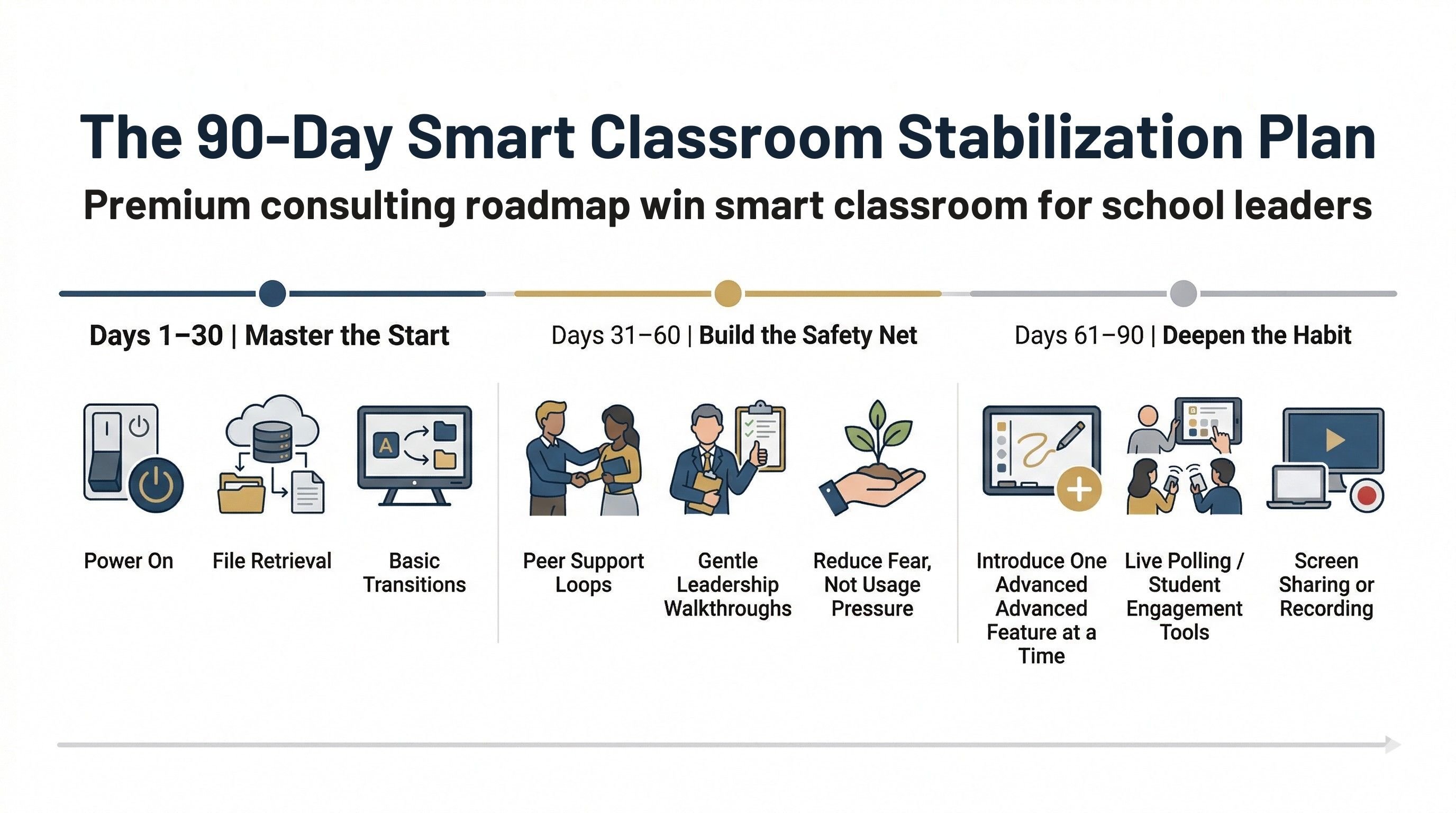
Phase 1: Days 1 to 30
Master the Start
The first month is not the time to chase advanced usage.
It is time to reduce panic.
In fact, this is the stage where many leaders need to do something that feels completely counterintuitive:
Ban advanced features for the first 30 days.
Yes, ban them.
Do not push live quizzes.
Do not push screen casting.
Do not push fancy tools just because the software has them.
Why?
Because the first victory is not innovation.
The first victory is a calm start.
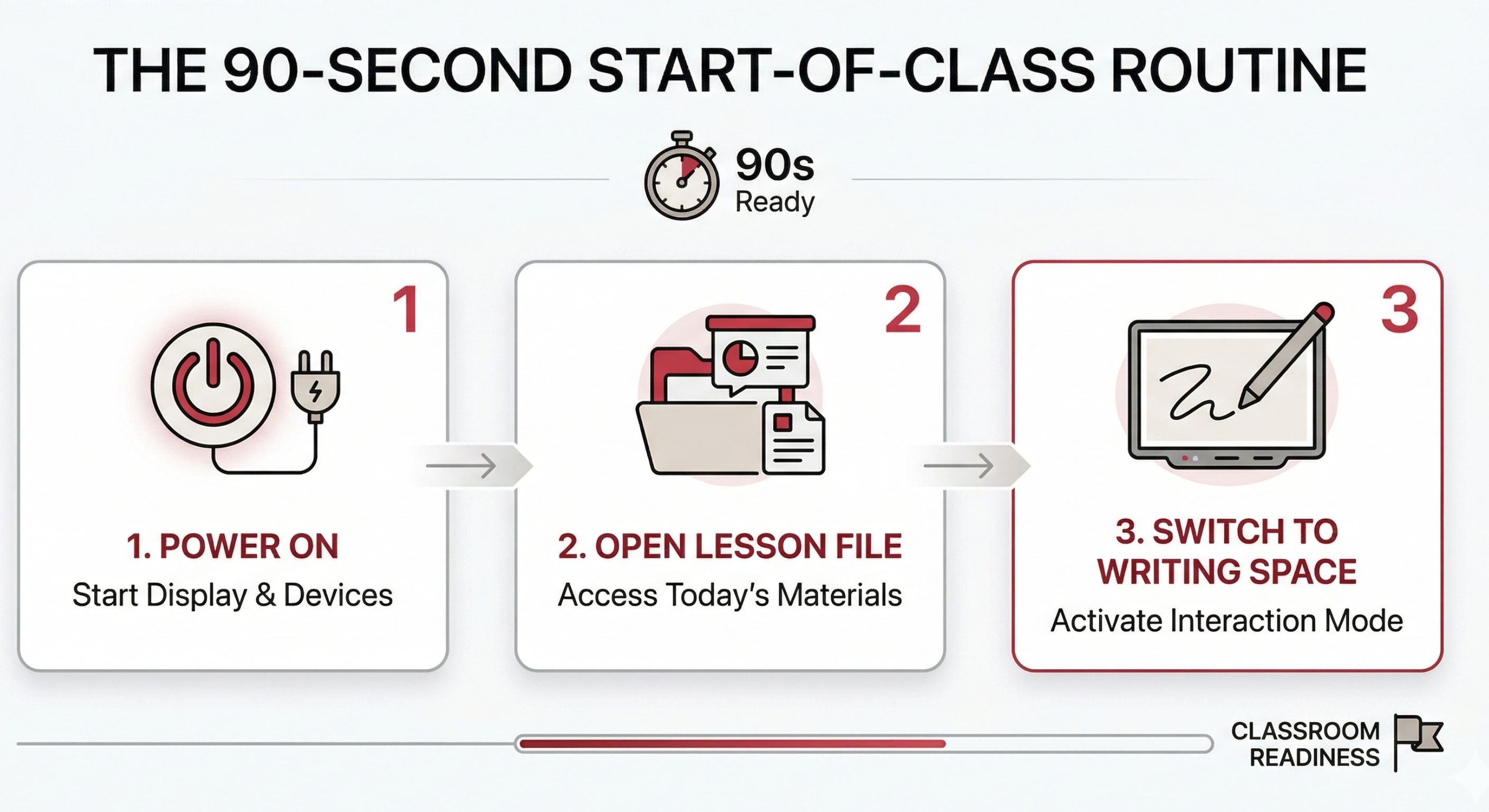
For the first 30 days, every teacher should master only three things:
1. Power On
Can the teacher turn on the board and begin without calling IT?
2. File Retrieval
Can they open the day’s lesson file in under 15 seconds?
3. Basic Transitions
Can they move smoothly from lesson content to a blank writing space and back again?
That is enough.
This is what builds psychological safety.
Because the start of class is when a teacher feels most exposed. If the panel freezes, the file cannot be found, or the screen does not respond, the teacher loses momentum immediately. And once that happens in front of students, avoidance begins.
That is why Month 1 should not be about “using all the features.”
It should be about one thing:
Winning the first 90 seconds of the lesson.
If the teacher can begin well, confidence grows.
If confidence grows, usage repeats.
If usage repeats, adoption starts.
That is how a habit is built.
Not by excitement.
By stability.
Phase 2: Days 31 to 60
Build the Safety Net
This is the phase most schools ignore.
The novelty has worn off.
The photos are over.
The “successful implementation” feeling is fading.
Now the real risk begins.
This is when old habits return.
A teacher who had a small issue in Week 2 starts avoiding the board again. Another teacher uses it only when someone helps. A third quietly goes back to the marker pen because it feels safer.
If leaders do not intervene properly during this stage, usage starts slipping without anyone admitting it.
That is why Days 31 to 60 are not about more hardware support.
They are about behaviour support.
Stop depending on IT for teaching confidence
Your IT team is important. But let’s be honest.
They can solve cable issues.
They can reboot systems.
They can troubleshoot network access.
But they are not the right people to help a teacher improve classroom flow.
A hesitant English teacher does not need another technical explanation.
They need to see someone like them use the system simply and successfully.
Create peer support loops
This is where strong schools separate themselves.
Pair cautious teachers with confident teachers nearby.
Let them observe each other.
Let them borrow lesson flow ideas.
Let them ask “small” questions without fear.
Peer support works because it feels safe.
It does not feel like inspection.
It does not feel like judgment.
It does not feel like another training session.
It feels human.
And human support changes behaviour faster than vendor slides ever will.
Do gentle leadership walkthroughs
This is where principals, vice principals, and academic coordinators matter most.
Walk into classrooms for 5 minutes.
Not to evaluate.
Not to catch mistakes.
Not to ask whether every feature is being used.
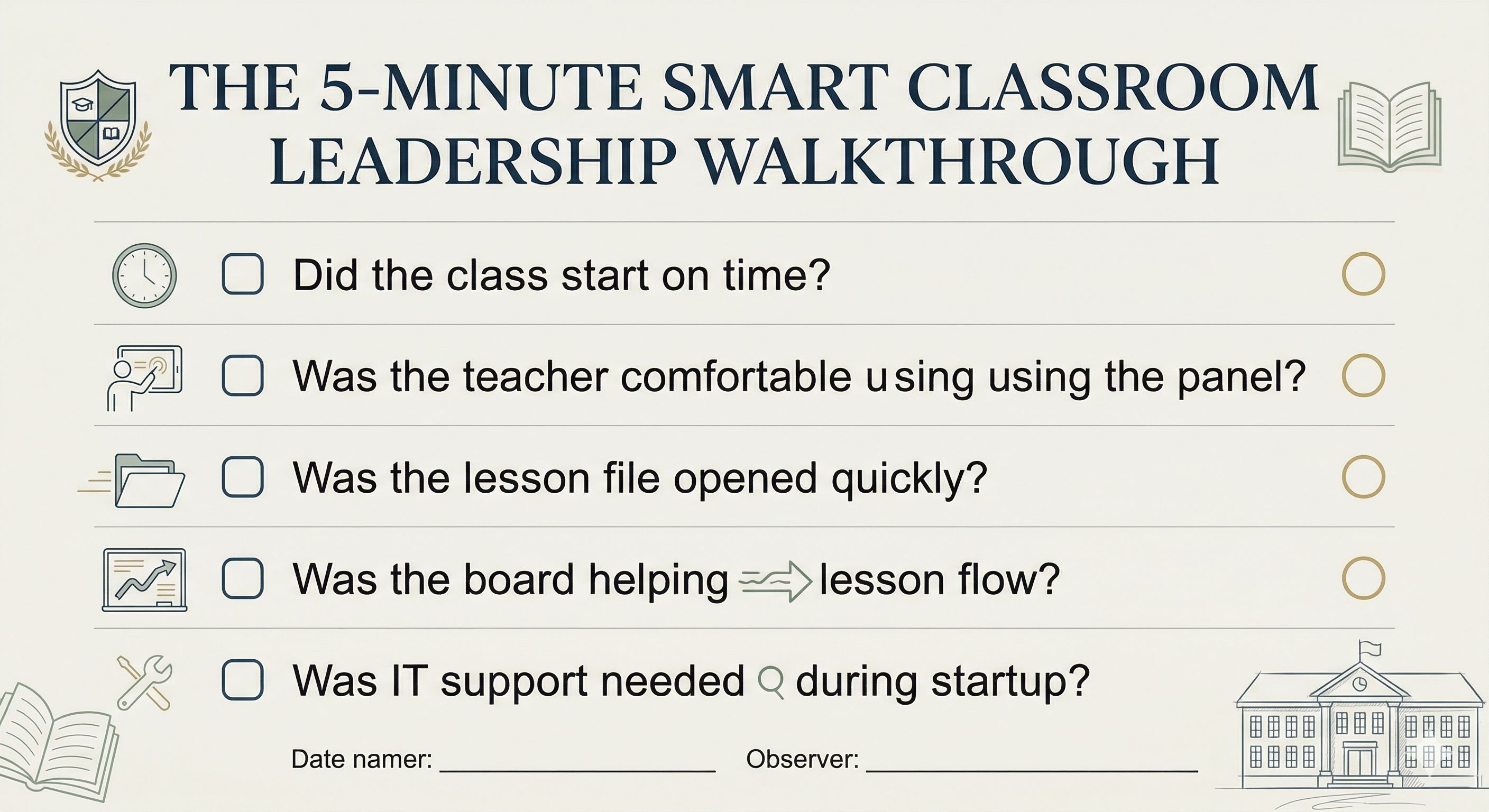
Just observe the flow.
Can the class start on time?
Does the teacher look comfortable?
Is the board helping teaching move smoothly?
That is the lens.
When teachers realise leadership is watching for support, not punishment, their fear drops.
And when fear drops, adoption rises.
Funny thing about schools: the board usually isn’t the scary part. The audience is.
Phase 3: Days 61 to 90
Deepen the Habit
By this stage, the classroom should feel different.
The teacher is no longer thinking,
“How do I use this panel?”
They are thinking,
“How do I teach this lesson well?”
That shift is everything.
Because now the technology is no longer the event.
It has become part of the teaching routine.
Only at this stage should you begin introducing the advanced tools you paid for.
And even here, the rule is simple:
Drip-feed. Do not dump.
Introduce one meaningful feature at a time.
Not because teachers are incapable.
Because schools are busy, classrooms are live, and overload kills usage.
A simple rollout could look like this:
Week 9
Introduce live polling or quick formative checks.
Week 11
Introduce student screen sharing or casting to showcase work.
Week 13
Introduce screen recording for revision or absent students.
That is enough.
When the foundations are stable, teachers learn faster.
Not because the training improved.
Because the fear reduced.
This is why slow implementation often creates faster long-term adoption.
The school that rushes usually gets superficial usage.
The school that stabilises first gets real classroom change.
What Leaders Must Stop Measuring
Many schools measure the wrong things in the first 90 days.
They ask:
- How many features were covered in training?
- How many sessions were conducted?
- How many teachers attended?
- How many tools are available?
None of those tells you whether the rollout is working.
A better question is this:
Can most teachers start class calmly, access their content quickly, and continue teaching without losing momentum?
That is the real KPI.
Not feature exposure.
Not software complexity.
Not trainer enthusiasm.
Just classroom stability.
Because if the beginning of the lesson is weak, the rest of the rollout is theatre.
What Real ROI Looks Like
A lot of schools talk about return on investment as if it comes from the product catalogue.
It does not.
True ROI comes from repeated daily use.
Not one demo day.
Not a launch event.
Not a good training photo.
If your teachers use the technology smoothly across ordinary school days, your investment starts compounding.
If they do not, then even the best panel becomes a very expensive wall-mounted projector.
That is the hard truth.
A smart classroom is not valuable because of what it can do.
It is valuable because of what teachers will actually use, repeatedly, under real classroom pressure.
That is why the first 90 days are not an afterthought.
They are the whole game.
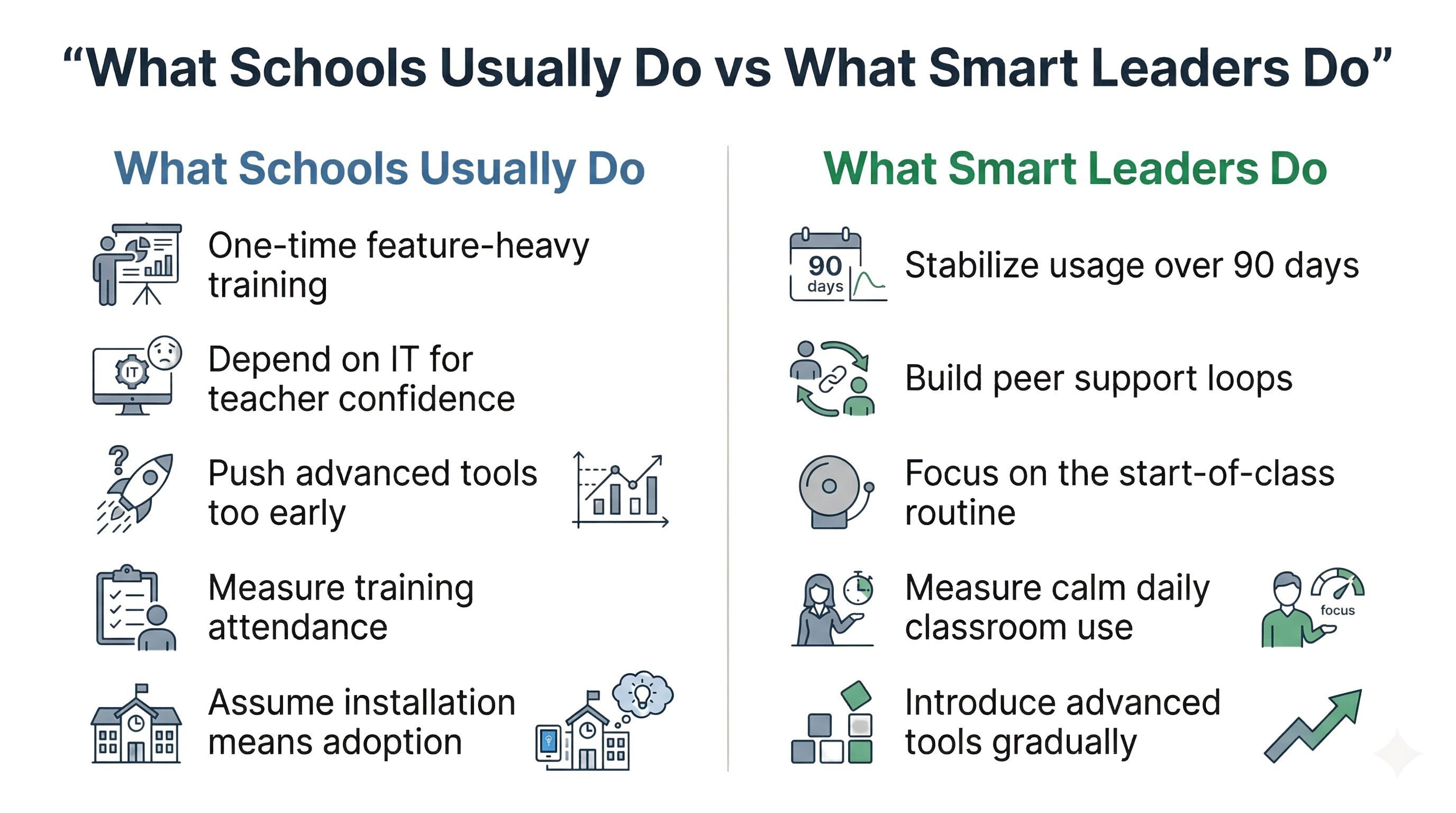
Slow Down to Speed Up
If you try to push advanced adoption in the first month, you will usually create hesitation, dependence, and quiet avoidance.
But if you use the first 90 days properly, you create something much more powerful:
- safer teachers
- calmer starts
- better classroom flow
- lower dependence on IT
- stronger principal visibility
- better long-term usage
That is how smart classroom projects survive beyond the launch phase.
Not through pressure.
Through stabilisation.
So if your school is investing in interactive panels, here is the question that matters most:
Do you want a successful installation?
Or do you want daily classroom use?
Because those are not the same thing.
And in schools, usage is the only result that counts.
FAQs on Smart Classroom Stabilisation
Why do smart classroom rollouts fail in the first 30 days?
Because schools overwhelm teachers too early. They push feature-heavy training before teachers have built simple start-of-class routines. The result is hesitation, stress, and fast abandonment.
What should leaders measure in the first month?
Measure start-time stability. If teachers can power on the board, open their lesson materials quickly, and begin teaching without panic, the rollout is moving in the right direction.
Who should own the 90-day stabilisation process?
School leadership. IT can support the system, but principals, coordinators, and academic leaders must drive classroom adoption, peer support, and walkthroughs.
What if a teacher still avoids the board after 90 days?
It is usually not a technical issue anymore. It is a confidence issue. That teacher needs empathetic peer support, not more feature training. The goal is to reduce fear, not increase pressure.
About the Author

Manoj Sundaram
Founder @ C3 iT Xperts
I help K–12 leaders turn "dusty" classroom tech into a daily teaching habit. 18 years and 11,000 classrooms have taught me that the best tech is the tech that "disappears" into the teaching rhythm.
18+
Years Experience
11k+
Classrooms
40k+
Educators Impacted
- interactive flat panel,
- Edtech consulting,
- smart classroom,
- Edtech,
- K12 Education India,
- SchoolLeadership,
- Smart Classroom Adoption,
- Teacher Technology Adoption,
- EdTech Leadership India,
- Interactive Flat Panel India