.png?width=1322&height=350&name=C3ITXperts-logo-R%20(1).png "C3ITXperts-logo-R (1)")
Not a one-day showroom moment. Not a feature list. Not a screen that looks brilliant until the first week of real use.
Products • ViewSonic Panels
ViewSonic Interactive Flat Panels for Schools in India
You are not buying a panel. You are buying what happens after installation.
Most panel decisions look smart in a demo. The real question is simpler. Will teachers use it easily? Will IT support it without daily friction? Will leadership still feel good about the decision after the novelty is gone?
Teacher confidence
myViewBoard ecosystem
Cleaner rollout logic
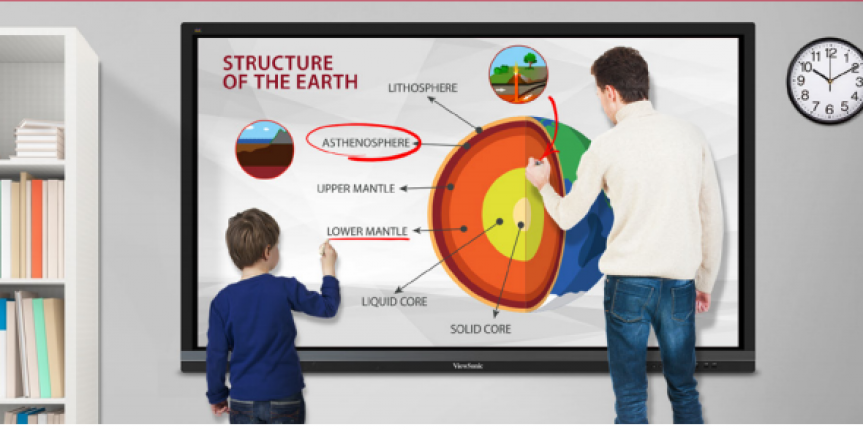
The panel is the visible part. The real value appears when teachers can start faster, teach smoother, and continue learning after class.
ViewSonic Panels for Schools in India
Why buyers lean in
Why this earns a serious place on the shortlist.
School leaders are not only comparing screens. They are comparing risk, rollout quality, and whether the classroom system will hold up after installation.
That does not guarantee classroom success. But it reduces procurement risk.
The value is not just the screen. It is the system around the screen.
One classroom is easy. Consistency across many classrooms is the real test.
See myViewBoard in action
What teachers can actually do with the system.
This is where the panel stops being a screen and starts becoming a teaching tool.
Magic Box
Shows how the ecosystem extends beyond the panel and supports classroom workflows more cleanly.
Slide Import
Useful for lesson prep. Teachers do not want to rebuild everything from scratch.
Embedded Browser
Shows how teachers can stay inside teaching flow instead of jumping across too many devices and tabs.
AI Pen
A strong proof feature. Best used as a teaching enhancer, not as a gimmick-led selling point.
Lesson Export
Important for learning continuity. The lesson should not disappear when the class ends.
Why schools lean toward ViewSonic
Why schools choose ViewSonic over another screen.
Schools do not choose ViewSonic only for the display. They choose it when they need a stronger teaching ecosystem that can work across classrooms.
It feels like a more complete decision
Not because the panel does everything. Because the panel does not stand alone.
It makes more sense after installation
Anyone can look good on demo day. The real question is what still works on an ordinary Tuesday.
It gets more interesting as rollout scale increases
One room hides mistakes. Twenty rooms expose them.
Sizes, selection, and school support
Choose the ViewSonic panel around the classroom—not the quotation.
Screen size is only the first decision. Viewing distance, class strength, teacher device, connectivity, software, installation, training, warranty, and ongoing support must work as one system.
65-inch ViewSonic panel
Often suitable for smaller classrooms with up to about 25 students. Confirm viewing distance and room layout before finalising.
75-inch ViewSonic panel
A practical option for many standard classrooms with up to about 40 students, subject to room depth and seating.
86-inch and larger panels
Better suited to larger classrooms, seminar rooms, and groups of roughly 50–75 learners where visibility becomes critical.
What C3 checks before recommending
We review classroom size, teacher workflow, EDLA or operating-system needs, OPS requirements, Wi-Fi, installation, warranty, training, and post-installation adoption support.
Request school-specific pricing
The correct price depends on panel size, model, computing option, installation, accessories, training, and support.
Installation and support across India
C3 supports schools in Chennai, Tamil Nadu, and across India—from classroom audit and product selection through installation, teacher onboarding, and adoption review.
Where the ecosystem becomes real
The panel is the surface. myViewBoard makes it useful.
You may shortlist ViewSonic for the hardware. You will value it for what myViewBoard lets teachers do with it every single day.
The teaching layer
myViewBoard turns the panel into a teaching system.
Your school is not investing in an interactive panel to make content bigger. Your school is investing because teachers need to explain better, annotate better, move faster through content, involve students more, and continue learning after class.
ViewSonic Panel
Hardware layer
myViewBoard
Teaching workflow layer
Manager
IT and management layer
ClassSwift
Engagement layer
How classroom value actually shows up
Before class. During class. After class.
01
Before class
The job is clarity. Teachers need a cleaner path from lesson idea to lesson delivery.
02
During class
The job is flow. The technology should support the lesson, not interrupt it.
03
After class
The job is continuity. Learning should not disappear when the bell rings.
What kills the decision
A strong buying decision can still fail in everyday school use.
This is where many smart classroom projects lose momentum. The hardware is fine. The daily experience is not.
Weak rollout logic after a strong buying decision.
That is where many smart classroom projects lose momentum.
Reality check
The panel may get selected in a meeting room. The verdict arrives in front of students.

Related reading
Do not evaluate panels in isolation.
A panel decision becomes stronger when it connects to classroom flow, teacher adoption, leadership visibility, and smart classroom usage after installation.
Smart Classroom Strategy for Schools in India
See how schools should think about classroom systems, adoption, and long-term ROI before they finalise product choices.
Explore the strategy pageViewSonic vs BenQ for Schools in India
Compare EDLA, teaching software, panel management, teacher adoption and three-year operating fit before approving a model.
Compare ViewSonic and BenQ5-Minute Smart Classroom Walkthrough Audit
Use this walkthrough to identify the hidden friction that slows lesson starts and reduces classroom usage.
Read the walkthrough auditThe Hidden Cost of Uneven Smart Classroom Usage
See how uneven teacher adoption quietly damages the return on classroom technology investments.
Read the ROI articleTeacher Support for Smart Classrooms
Explore what schools need to reduce hesitation, improve teacher confidence, and increase daily usage.
Explore teacher supportSmart Classroom IT Support Systems
See how IT and AV teams can reduce recurring friction and make classroom systems easier to support at scale.
Explore IT supportSmart Classroom Reset Guide
A practical guide for schools that want their classroom technology to get used properly after installation.
Download the guide
Fit check
You probably do not need more explanation. You need more clarity.
This quick fit check helps you see whether your priorities line up with what usually makes a ViewSonic deployment work well in real school conditions.
Choose your top 5 priorities
Your fit score
0 / 100
Fit band
Frequently asked questions
Why, what, and how schools should think about ViewSonic panels.
A better buying decision usually comes from answering the right questions before the shortlist feels final.
Why do schools in India lean toward ViewSonic panels?
Why it matters
Schools are not only buying a display. They are buying a classroom system that teachers need to use without hesitation.
What stands out
ViewSonic becomes attractive when the buyer values ecosystem strength, teaching workflow, classroom usability, and rollout consistency.
How to think about it
Do not ask only whether the screen looks good in demo. Ask whether the system still feels easy on an ordinary Tuesday after installation.
What makes ViewSonic more than just another interactive flat panel?
What it means
The panel is the visible hardware layer. The actual value grows when the software and workflow around it help teachers teach more smoothly.
Why that matters
Schools often compare hardware features but ignore the classroom system around the screen. That is where many buying decisions become weak later.
How to evaluate it
Look at lesson prep, in-class flow, annotation, content access, continuity after class, and support dependency. That is where the difference becomes visible.
How should a school evaluate ViewSonic panels properly?
Why most evaluations fail
Many schools compare panels using price, size, Android version, and demo impact. Those are easy to compare, but they do not tell the full classroom story.
What should be checked
Lesson start speed, teacher ease of use, software workflow, writing experience, classroom consistency, and support burden should all be tested.
How to test it
Simulate a real class. Open real content, annotate naturally, switch resources, and continue teaching without awkward pauses. That is the real buying test.
What role does myViewBoard play in the decision?
What it is
myViewBoard is the teaching workflow layer that turns the panel from a display surface into a classroom tool.
Why it matters
The more a school values lesson prep, in-class flow, engagement, and learning continuity, the more important the software layer becomes.
How to think about it
If the panel is the visible purchase, myViewBoard is the part that often determines whether teachers actually keep using it.
How should schools think about rollout after buying ViewSonic panels?
Why rollout matters
A strong product choice can still disappoint if rollout logic is weak, teacher confidence is low, or classroom routines are not designed properly.
What schools should plan
Schools should plan onboarding, teacher support, usage expectations, IT support patterns, and how consistency will be maintained across classrooms.
How to judge success
Success is not installation completion. Success is stable classroom usage, lower friction, and confidence across ordinary teachers, not just power users.
Next serious step
You do not need another generic quote.
You need to know whether this setup will actually work in your classrooms. That means understanding whether the panel fits your teaching reality, whether myViewBoard will actually be used, whether OPS matters in your workflow, and whether the rollout will hold up beyond installation.
- Get a fit-based recommendation
- Clarify panel, OPS, and rollout planning
- Reduce decision risk before purchase
- Move from shortlist to implementation confidence
Final step
Do not choose a panel that only looks right in demo.
Choose a system that still feels right when teachers are busy, students are waiting, and the school day is fully alive.