.png?width=1322&height=350&name=C3ITXperts-logo-R%20(1).png "C3ITXperts-logo-R (1)")


Updated August 19th 2026
Your school has installed interactive panels.
The software is active.
The teachers attended training.
Then Monday morning arrives.
A teacher cannot find the lesson file. The panel is on the wrong input.
A cable is missing.
The Wi-Fi is slow. Students are waiting, so the teacher returns to the textbook or blackboard.
The panel is still on the wall three months later.
But it is no longer part of the lesson.
This is the hidden problem with front-of-class technology.
Schools often complete the installation but never design the daily teaching habits that make the system useful.
The most important part of front-of-class technology is not the screen.
It is what happens before, during, and after the screen is used.
A front of class display can help teachers explain ideas, show evidence, invite student responses, and review learning.
It can also become an expensive television if the school does not create a reliable classroom workflow.
This guide explains why front-of-class technology fails to deliver its promise and what principals, school owners, academic leaders, IT teams, and teachers can do to improve adoption.
The goal is not to make teachers use every feature.
The goal is to make useful technology feel normal during an ordinary lesson.
What does front of class technology failure look like?
Failure is not always a blank screen or broken device.
The panel may switch on. The software may be licensed.
The vendor may have completed the installation. The school may even receive a successful handover report.
The real warning signs appear in daily behavior:
- Teachers use the display only for videos.
- Lessons start late because files and inputs are difficult to find.
- Students watch but rarely contribute.
- Teachers call IT for basic classroom actions.
- Some departments use the panel while others avoid it.
- Lesson resources disappear when one confident teacher leaves.
- The next teacher inherits open accounts, files, and unfinished work.
- Leaders cannot explain whether the investment improved teaching.
These signs point to an adoption problem.
The school has not connected the display with:
- Teacher planning
- Lesson delivery
- Student participation
- Assessment
- Support
- Leadership expectations
A working device is not the same as a working classroom system.
Why front of class technology fails after installation
1. Installation is treated as the finish line
Installation is a physical event.
A team mounts the panel, connects the cables, activates the software, and demonstrates the main features. The room looks complete.
But adoption begins after the installers leave.
A successful installation answers questions such as:
- Is the panel mounted safely?
- Does it switch on?
- Can it display content?
- Are the main inputs working?
- Is the network connected?
A successful adoption plan answers different questions:
- Can a teacher begin without waiting for help?
- Can the teacher find the correct lesson quickly?
- Can students respond or contribute?
- Can useful work be saved and reused?
- Can the class continue if the internet fails?
- Is support available after the training session?
The first list belongs to the installation team.
The second list belongs to school leadership.
If leadership treats the handover document as proof of transformation, the project may begin drifting immediately.
2. There is no predictable first minute routine
The first minute of class shapes the rest of the lesson.
Students are settling. The teacher is establishing attention.
The learning goal needs to become clear.
If that minute is spent searching for files, opening applications, changing inputs, or waiting for the panel, the class starts with uncertainty.
After several difficult starts, teachers make a reasonable decision: they use the method that feels safest.
For many teachers, that may be a textbook, marker board, or printed worksheet.
The solution is not to tell teachers to “use the technology more.”
The solution is to design one predictable first-minute routine.
For example:
- Use a consistent wake-up or power-on process.
- Display the learning goal or starter question.
- Store lesson files in one agreed location.
- Use a standard sign-in and file-access process.
- Begin the starter activity while the teacher completes the final setup.
The routine should work without an IT person standing beside the teacher.
For more adoption ideas, see 7 Daily Routines That Make Smart Classrooms Actually Work.
3. Training teaches features instead of lesson flow
A long product demonstration can show many buttons.
Teachers may learn how to change pen colors, open the digital whiteboard, cast a screen, launch an application, or create a poll.
But they may still not know how to use the system from the beginning to the end of a real lesson.
Feature training asks:
-What does this button do?
Workflow training asks:
-When would I use this during tomorrow’s lesson?
-Teachers need to practice complete classroom actions:
- Prepare the lesson
- Open it quickly
- Explain one idea
- Invite a student response
- Annotate a useful answer
- Check understanding
- Save the lesson evidence
- Reset the room
The school does not need every teacher to become an expert in every feature.
It needs every teacher to feel confident with the small number of actions that matter most.
Short, repeated practice is usually more useful than one feature-heavy training day.
4. Nobody owns adoption after the supplier leaves
Most schools know who owns the equipment.
They do not always know who owns adoption.
The IT team may manage connectivity, device settings, accounts, and faults.
That is important, but IT should not be the only team responsible for classroom use.
A useful ownership model might look like this:
- Principal: Sets the expectation and reviews progress.
- Academic coordinator: Connects the system to lesson quality.
- ICT lead: Supports accounts, devices, software, and troubleshooting.
- Teacher mentors: Share practical examples with colleagues.
- Department heads: Help routines become subject-specific.
- Teachers: Practice the agreed workflow and report friction.
- Implementation partner: Provides follow-up support and improvement guidance.
Without clear ownership, adoption becomes everyone’s responsibility and nobody’s priority.
5. The display becomes a television
A school may invest in an interactive panel and use it only for videos or PowerPoint slides.
The picture is clear. The content is visible. But the learning remains passive.
A stronger lesson treats the front-of-class display as a shared working surface.
Students might:
- Mark evidence in a passage
- Label a science diagram
- Solve a problem step by step
- Compare two approaches
- Present group work
- Respond to a quick question
- Build a visual explanation
The panel should support the teacher’s method, not replace teaching with a playlist of videos.
Read What Technology Does a Smart Classroom Actually Need? to see how
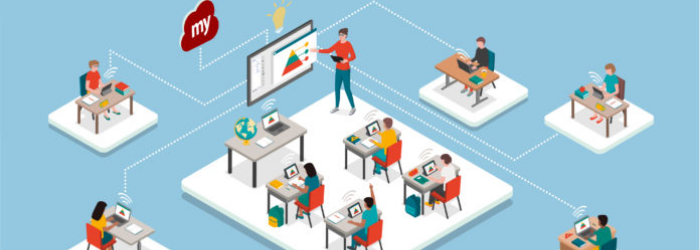
The display should connect with the network, cloud, teacher device, software, assessment, and support system.
6. Infrastructure problems destroy confidence
Teachers may be willing to use technology. Repeated failures change that willingness.
One failed lesson may feel like an accident. Several failed lessons become a warning.
Common problems include:
- Weak Wi-Fi in the classroom
- Unstable power or missing protection
- A missing or unsuitable teacher computer
- Slow software updates
- Broken cables or missing accessories
- No offline backup for essential lessons
- Delayed service visits
- Unclear responsibility for repairs
When these problems repeat, teachers learn that using the panel is risky.
They return to a method that helps them complete the lesson without interruption.
Before blaming teachers for low adoption, test the infrastructure during normal school use. Open real files. Restart the device.
Test the system when the school is busy. Disconnect the internet and check whether the teacher has a sensible backup.
A technology system earns trust by working predictably.
7. The school measures activity instead of value
A panel can be switched on for six hours without improving teaching.
A login report can show activity without showing learning.
Schools should measure more than:
- Device uptime
- Number of training attendees
- Number of software features
- Number of panels installed
Useful adoption measures include:
- Time from teacher entry to lesson start
- Weekly use of the agreed classroom routine
- Student contribution during lessons
- Number of lesson resources saved and reused
- Frequency of technical support requests
- Speed of support resolution
- Consistency across departments and classrooms
- Teacher confidence after follow-up support
The central question is simple:
Is front of class technology making teaching easier and student participation stronger?
If the school cannot answer that, it needs a better review system.
What should a principal observe during a walkthrough?
A principal does not need to stay for the entire lesson to identify adoption problems.
A short, supportive walkthrough can reveal a great deal.
Watch the first 90 seconds
Ask:
- Does the teacher begin calmly?
- Is the learning goal visible?
- Is the teacher searching for files?
- Are students already working on a starter task?
Watch the teacher’s movement
A confident teacher uses the display as part of the lesson and continues looking at students.
A hesitant teacher may remain beside the screen, focus on menus, and avoid moving around the classroom.
Watch transitions
The movement from a video to a blank board, from explanation to group work, or from a question to feedback should not stop the class.
Long pauses often show that the workflow is not stable.
Watch student behavior
Are students explaining, discussing, solving, and responding?
Or are they only looking at a bright screen?
The goal is not more screen time. The goal is better learning activity.
Watch the final two minutes
A strong ending includes saving useful work, closing personal accounts, and leaving the room ready for the next teacher.
For a structured review, use The 5-Minute Tech Audit for Principals.
How schools can fix adoption in 90 days
A school does not need to introduce every feature immediately.
A phased approach is easier for teachers and easier for leadership to manage.
Days 1–30: Stabilise the start
Focus on three actions:
- Start the panel and lesson quickly.
- Find the correct content without confusion.
- Move between content and basic annotation.
Avoid feature overload.
Do not make every teacher learn every tool in the first month. Build confidence through repetition.
Leadership should ask teachers what is slowing them down and remove those obstacles quickly.
Days 31–60: Build the support network
The initial excitement may fade during this period. Quiet avoidance often begins here.
Create peer support.
Pair teachers who need help with colleagues who can demonstrate a simple lesson routine.
Run short practice sessions instead of long feature-heavy workshops.
Conduct brief walkthroughs focused on support, not inspection.
If a teacher is struggling, ask which part of the workflow creates difficulty.
Do not assume more technical information will solve a confidence problem.
Days 61–90: Add meaningful interaction
Once basic routines are stable, introduce one advanced activity at a time.
Examples include:
- Quick formative polls
- Student screen sharing
- Collaborative annotation
- Saved revision explanations
- Digital exit tickets
- Recorded lesson summaries
Choose tools that solve a real teaching need.
After each new activity, review what became easier and what created extra work.
Use the 90-Day Smart Classroom Stabilization Plan for a longer implementation framework.
What if the current installation is already underused?
Schools do not always need to replace the panel.
They may need to repair the operating system around it.
Start with a short recovery review.
Check the equipment
Confirm that the panel, computer, cables, network, speakers, and software are working. List every issue that interrupts teaching.
Check the teacher workflow
Ask teachers to demonstrate how they start a lesson, find content, annotate, save work, and get support.
Do not ask only whether they like the technology.
Ask them to show what happens during a real class.
Choose one routine
Select one action for every teacher to practice for two weeks.
For example, every teacher may use the panel to display and annotate one student response.
Support the routine
Provide a short demonstration, a quick guide, a mentor, and a simple way to report problems.
Review the result
Ask whether the routine saved time, improved participation, or created extra work. Keep it, adjust it, or replace it based on evidence.
This process is often more effective than buying another tool.
How to include the full cost of adoption
School technology budgets often focus on the display price.
That is only one part of the investment.
Include:
- Room assessment
- Mounting and installation
- Power protection
- Network improvement
- OPS or teacher devices
- Software and content licenses
- Teacher enablement
- Follow-up support
- Repairs and maintenance
- Replacement planning
A low quotation may look attractive because important items are missing.
Use C3 iT Xperts’ interactive flat panel price guide for Indian schools to understand.
why two quotations for the same panel size can have very different final costs.
Smart classroom adoption checklist
Before approving a rollout or recovery plan, confirm that the school has:
- A clear teaching purpose
- A tested start-of-class routine
- A responsible adoption owner
- A trained teacher support group
- Reliable power and connectivity
- An offline backup plan
- A practical file and software workflow
- A support response process
- Monthly classroom-use reviews
- Measures that track teaching value, not only device activity
How C3 iT Xperts can help schools
C3 iT Xperts helps schools plan, select, implement, and adopt classroom technology.
Support can include:
- Classroom technology audits
- Interactive panel evaluation
- Teacher workflow design
- Infrastructure review
- Adoption planning
- Teacher enablement
- Leadership walkthroughs
- Support and improvement reviews
The goal is not to make the school buy more technology.
The goal is to help the school use the technology it already has-or choose new technology with a clear adoption plan.
If your school’s panels are installed but underused, begin with a classroom technology consultation.
Frequently asked questions
Why do smart classrooms fail after installation?
They usually fail because installation is treated as the final step. Teachers still need simple routines, reliable support, practical training, and leadership follow-up after the equipment arrives.
Is the problem always the interactive panel?
No. The problem may be weak Wi-Fi, unstable power, missing computer hardware, incompatible software, unclear file storage, limited training, or a lack of daily adoption expectations.
Why do teachers return to the blackboard?
Teachers return to the blackboard when the digital workflow takes longer, feels risky, or interrupts the lesson. The solution is to reduce friction and build confidence through simple, repeatable routines.
How long should a school run a pilot?
A pilot should run for at least two weeks so teachers can use the system during normal lessons. A longer pilot can reveal support, file-access, and reliability problems that do not appear during a short demonstration.
What should schools measure after installation?
Measure how quickly classes begin, how often teachers use the agreed routines, how students participate, how many resources are saved, how many support requests occur, and whether usage is consistent across rooms.
Is more training always the answer?
No. Teachers need the right kind of support. Product training explains the device. Practice, peer support, and classroom coaching help teachers build daily habits.
Can an older smart classroom installation be recovered?
Often, yes. Begin with an equipment check, workflow review, one simple adoption routine, and a 30- to 90-day support plan. Replacing hardware should not be the first response.
How can a school calculate smart classroom ROI?
Look at repeated classroom use, reduced setup time, teacher confidence, student participation, saved lesson resources, support costs, and consistency of usage across the school. Device uptime alone is not ROI.
About the Author

Manoj Sundaram
Founder @ C3 iT Xperts
I help K–12 leaders turn "dusty" classroom tech into a daily teaching habit. 18 years and 11,000 classrooms have taught me that the best tech is the tech that "disappears" into the teaching rhythm.
18+
Years Experience
11k+
Classrooms
50k+
Educators Impacted
- Online Classrooms,
- interactive flat panel,
- ICT classroom technology,
- myviewboard,
- Teaching Tips,
- ICT classroom,
- Learning Outcomes,
- Education,
- Virtual Classrooms

.jpg)


.png)