.png?width=1322&height=350&name=C3ITXperts-logo-R%20(1).png "C3ITXperts-logo-R (1)")


Updated August 17th 2026
A classroom can have an interactive panel, fast Wi-Fi, tablets, cameras, and digital content.
It can look modern.
Parents may be impressed during a school tour.
Students may take photographs of the room.
But does technology improve learning?
That is the question school leaders should ask.
A classroom of the future is not created by placing more devices in a room.
It is created when the space, teacher, technology, and learning goals work together.
A smart classroom is not the room with the most technology.
It is the room where technology helps people learn better.
The future classroom should help teachers explain clearly, help students participate actively, and help school leaders understand what is working.
This guide explains seven practical ways schools can move toward that future without buying technology simply because it is new.
What Does a Future Ready Classroom Need?
A future-ready classroom should support:
- Flexible teaching
- Active student participation
- Digital and offline learning
- Collaboration
- Assessment and feedback
- Safe access to information
- Teacher confidence
- Reliable infrastructure
- Communication with families
- Continuous improvement
The interactive display may be part of the solution.
It is not the complete solution.
A school also needs a clear purpose, a practical implementation plan, and support that continues after installation.
Begin With a Learning Vision
The first step is not buying an interactive panel.
The first step is deciding what the school wants to improve.
A school may want to:
- Increase student participation
- Improve reading and writing practice
- Help students understand difficult concepts
- Support group work
- Provide faster feedback
- Help absent students review lessons
- Improve digital skills
- Connect classroom learning with real-world problems
These goals should guide the technology decision.
Write the vision in simple language
A useful learning vision answers four questions:
- What should teachers be able to do?
- What should students be able to do?
- What problem should technology solve?
- How will the school measure improvement?
For example:
We want students to take part in more classroom activities, while teachers use digital displays and shared resources to explain concepts, check understanding, and provide feedback.
This is more useful than saying:
We want the classroom of the future.
The vision should also be practical.
It should describe what teachers will do on an ordinary school day, not only what the room will look like during a demonstration.
Create a Smart and Flexible Learning Space
The classroom itself affects how technology is used.
A fixed classroom with rows of desks may make collaboration difficult, even when the room has an interactive display.
A future-ready classroom should allow teachers to change the arrangement when the lesson changes.
Useful classroom features
Schools may consider:
- Flexible desks
- Small study pods
- Clear walking space
- Charging points
- Cable management
- Mobile stands where appropriate
- Display placement that everyone can see
- Comfortable lighting
- Better room acoustics
- Storage for devices
- Accessible furniture
The goal is not to make every classroom look like a technology showroom.
The goal is to give teachers more than one way to teach.
A teacher may need students in groups for a project, in pairs for discussion, or facing the front for direct instruction.
The furniture and technology should support all three situations.
Consider the last row
A display may look clear from the front of the room and still be difficult to read at the back.
Test normal lesson content from the furthest seat.
Check text, diagrams, equations, maps, and video subtitles.
Room layout should be planned around learning, not only around the location of the power socket.
Give Teachers a New Role, Not More Pressure
Technology changes the teacher’s role, but it does not reduce the teacher’s importance.
The teacher remains responsible for:
- Choosing useful content
- Explaining difficult ideas
- Asking questions
- Managing the classroom
- Checking understanding
- Supporting different learners
- Giving feedback
Technology can help with these tasks, but it cannot replace professional judgment.
Move from presenter to learning guide
In a traditional lesson, the teacher may speak while students listen and copy notes.
In a future-ready lesson, the teacher may explain briefly, show a model, ask students to explore, and then use their responses to guide the next task.
The teacher becomes a guide, coach, questioner, and reviewer.
This does not mean every lesson must be fully digital.
Teachers should decide when technology adds value and when a book, paper, conversation, experiment, or handwritten activity is better.
Make adoption safe
Teachers are more likely to use technology when they can practice without fear of public failure.
Schools should provide:
- Short practical training
- Time to practice
- Peer support
- Clear classroom routines
- A simple backup plan
- Quick technical help
- Friendly walkthroughs
One launch-day workshop is not enough.
Read Why Teachers Avoid Smart Boards to understand how confidence and classroom safety affect adoption.
Build Reliable Connectivity and Digital Infrastructure
A future-ready classroom depends on a reliable network.
If the internet fails during every second lesson, teachers will avoid online resources.
If files are stored on personal devices, teachers will spend time searching for content.
If devices cannot connect, students will stop trusting the system.
Check the network inside every classroom
Review:
- Wi-Fi coverage
- Network speed during school hours
- Access-point capacity
- Cabling and switches
- Network security
- Backup internet
- Content filtering
- Device management
Do not test only near the server room.
Test when students and teachers are using the network.
A school may have a fast internet connection and still have poor classroom performance because of weak Wi-Fi or old internal equipment.
Protect power and devices
Check:
- Power sockets
- Earthing
- Surge protection
- UPS requirements
- Cable safety
- Device charging
- Safe storage
Power and network planning should happen before equipment arrives.
Use Digital Content and Communication Wisely
A future classroom should make learning resources easier to find, use, share, and review.
Teachers may use:
- Digital textbooks
- Presentations
- Videos
- Simulations
- Online maps
- Learning platforms
- Digital worksheets
- Assessments
- Shared lesson folders
But digital content should not become a collection of random links and applications.
The school should create a clear content system.
Build a shared resource library
Use a school-managed cloud with:
- Subject folders
- Grade-level folders
- Clear file names
- Access rules
- Backup procedures
- A process for reviewing old content
A strong lesson should not disappear when the teacher changes schools or takes leave.
The school should be able to reuse and improve good content.
Communicate with families carefully
Digital tools can help schools share:
- Homework
- Lesson reminders
- Revision resources
- Attendance information
- Student work
- School announcements
- Parent guidance
Communication should be clear and purposeful.
Parents should not receive messages from many unrelated platforms.
Choose approved communication channels and explain how families should use them.
The future classroom is more connected, but it should not become more confusing.
Introduce New Learning Experiences Gradually
Virtual reality, augmented reality, artificial intelligence, robotics, coding, simulations, and interactive media can create valuable learning experiences.
But schools should not buy emerging technology only because it is fashionable.
Each tool should answer a learning question.
Virtual and augmented reality
VR may help students explore places, environments, systems, or experiences that are difficult to visit in person.
It may be useful for:
- Virtual field trips
- Science models
- Historical environments
- Engineering demonstrations
- Safety training
- Medical or technical simulations
Before buying, ask:
- What will students learn?
- How many students can use it?
- How long does setup take?
- Does it require special devices?
- Can teachers manage the activity?
- Is the content age-appropriate?
- Is there a non-VR alternative?
Artificial intelligence
AI tools may help teachers create summaries, questions, study guides, or differentiated activities.
They can also help students explore ideas and receive practice.
However, AI output can contain mistakes.
Teachers must review content before using it.
Schools also need rules for privacy, copyright, student access, and responsible use.
The purpose of AI should be to support learning-not to remove teacher judgment.
Start with a pilot
Choose one subject, one grade, or one teacher group.
Test the experience in real lessons.
Collect feedback before expanding.
Create Continuous Teacher Training and Support
The future classroom will keep changing.
Teachers cannot learn every new tool in one training session.
Schools need a continuous development plan.
A practical training cycle
1: Start with the basics
Teach teachers how to start, access, present, write, save, and share.
2: Connect tools to lessons
Show how the technology supports questioning, group work, explanation, and assessment.
3: Share classroom examples
Let teachers demonstrate one successful activity to colleagues.
4: Review real usage
Ask what saved time, what caused problems, and what support is needed.
5: Add the next skill
Introduce one new feature only after the basics feel comfortable.
Professional development should be supportive rather than punitive.
Teachers should be able to ask for help without feeling that they are failing.
Read The 90-Day Smart Classroom Stabilization Plan for a practical approach to building daily technology habits.
A Practical 30 Day Start
Schools do not need to transform every classroom in one month.
Start with one grade, department, or pilot group.
Days 1–5: Listen and observe
Speak with teachers and watch real lessons. Note where students lose attention, where teachers lose time, and where technology creates delays.
Days 6–12: Choose one improvement
Select one clear routine, such as a faster lesson start, a shared lesson folder, a digital exit ticket, or one interactive group activity.
Days 13–20: Practice with support
Let teachers use the routine in real classrooms. Pair confident teachers with colleagues who need support. Fix technical problems quickly and avoid judging teachers publicly.
Days 21–30: Review the evidence
Ask teachers what became easier.
Ask students what helped them participate. Review the lesson files, support calls, and classroom observations.
Then decide what to improve next.
A small pilot creates better information than a large purchase based only on a sales demonstration.
What to Put in a Technology RFP
A future-classroom request for proposal should describe the teaching problem, not only the equipment list.
Ask suppliers to include:
- A real lesson workflow demonstration
- Teacher training and follow-up support
- Network, power, room, and mounting requirements
- Device and software compatibility
- Data privacy and security requirements
- One-time and recurring costs
- Warranty and response times
- A two-to-four-week classroom proof of concept
- A plan for exporting content if platforms change
Score proposals for teacher ease of use, student participation, classroom fit, support, software continuity, security, and five-year value.
This makes the purchase easier to explain to teachers, trustees, finance teams, and IT staff.
Measure the Classroom, Not Just the Device
A school can have a panel switched on for six hours and still have a passive classroom.
The school should measure what happens during learning.
Track:
- Time taken to start a lesson
- Teacher confidence
- Student participation
- Group activity
- Assessment use
- Lessons saved and reused
- Technical interruptions
- Support calls
- Differences between classrooms
During a walkthrough, ask:
- Is the teacher relaxed?
- Can students see and hear the content?
- Are students answering, creating, and explaining?
- Does technology help the lesson move forward?
- What happens when the internet or device fails?
The purpose of measurement is not to punish teachers.
It is to find friction and remove it.
A Four-Phase Classroom of the Future Plan
1: Define and audit
Set the learning goals. Speak with teachers. Audit rooms, network, power, cloud, devices, and support.
2: Pilot
Choose a small group of classrooms. Use real lessons and collect teacher and student feedback.
3: Improve and expand
Fix the problems found in the pilot. Add more classrooms, training, and shared resources.
4: Connect the system
Add student devices, hybrid tools, advanced assessment, AI, VR, or analytics only after the foundation is stable.
Do not move to the next phase because the budget is available.
Move because the people and system are ready.
Common Mistakes to Avoid
Avoid these mistakes:
- Buying technology without a learning goal
- Treating the panel as the entire smart classroom
- Changing furniture without checking teacher workflow
- Ignoring Wi-Fi and power
- Giving teachers too many applications
- Training once and expecting permanent adoption
- Assigning online work without considering home access
- Introducing AI or VR without a clear purpose
- Measuring installation instead of learning use
- Buying the most expensive product without a pilot
The classroom of the future should be more flexible and more human.
It should not create more work for teachers or more barriers for students.
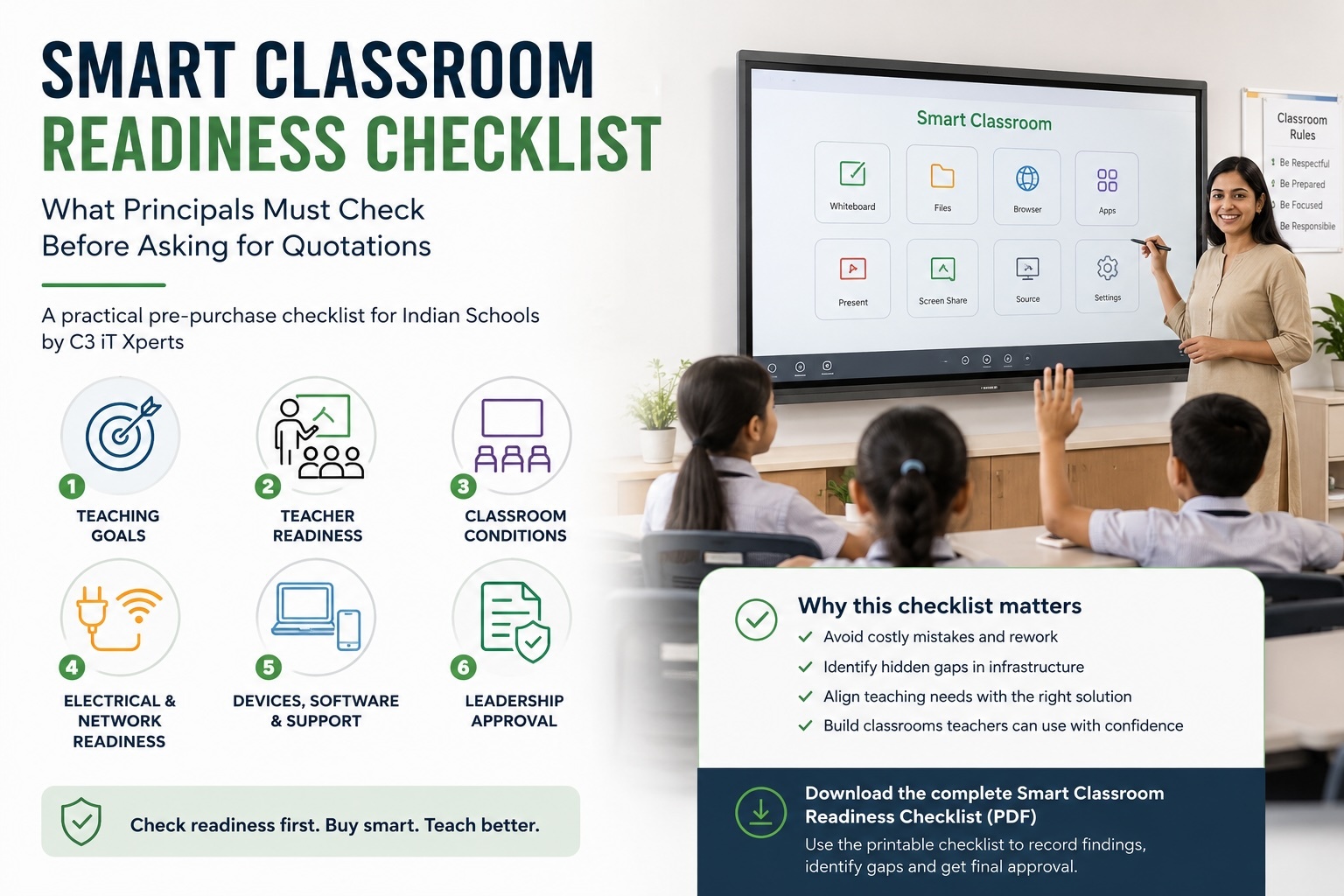
Smart Classroom Readiness Checklist
Before approving a future-classroom project, ask:
Learning
- What should improve?
- How will the school measure it?
- Which subjects will use the system first?
Teachers
- Have different teacher groups been consulted?
- Is practical training included?
- Is follow-up support available?
Students
- Will students create and participate?
- Is access fair for students without home technology?
- Are there clear device and safety rules?
Infrastructure
- Is Wi-Fi reliable?
- Is power protected?
- Are rooms flexible and accessible?
- Is the display visible from the last row?
Content
- Are lesson files stored in a managed cloud?
- Can teachers reuse resources?
- Are privacy and copyright rules clear?
Support
- Who supports the equipment?
- Are updates and replacements planned?
- Has the school completed a pilot?
What C3 IT Xperts Can Help With
C3 IT Xperts helps schools plan and implement classroom technology around learning goals, teacher workflows, infrastructure, and long-term support.
Support can include:
- Classroom technology audits
- Smart classroom planning
- Display and device recommendations
- Network and infrastructure checks
- Teacher training
- Proof-of-concept planning
- Phased rollout support
- AV integration
- Ongoing maintenance and support
The goal is not simply to place more technology in the classroom.
The goal is to help teachers teach better and help students learn with more confidence.
Internal Reading for School Leaders
Explore these related guides:
- What Technology Does a Smart Classroom Actually Need?
- Smart Classroom Planning Guide for Indian Schools
- Smart Classroom Readiness Checklist for Indian Schools
- Why Teachers Avoid Smart Boards
- The 5-Minute Tech Audit for Principals
Frequently Asked Questions
What is a classroom of the future?
It is a flexible, connected learning environment where teachers use suitable technology to support explanation, participation, collaboration, assessment, and feedback.
Does a future classroom need an interactive panel?
An interactive panel can be useful, but it is only one part of the system. The school also needs trained teachers, reliable infrastructure, digital content, support, and learning goals.
How can schools prepare teachers for future technology?
Use regular, practical training based on real lessons. Give teachers time to practice, share examples, and ask for help without fear of being judged.
Does every classroom need virtual reality?
No. VR should be introduced when it supports a clear learning goal and when the school can manage the equipment, content, safety, and student access.
How can schools use AI responsibly?
Set clear rules for privacy, copyright, source checking, student use, and teacher review. Use AI to support learning, not to replace teacher judgment.
What should schools buy first?
Start with a learning goal and readiness audit. The first investment may need to be network, training, cloud storage, or support rather than another device.
How can schools measure future-classroom success?
Measure teacher adoption, student participation, lesson preparation time, assessment use, saved resources, technical interruptions, and teacher confidence.
About the Author

Manoj Sundaram
Founder @ C3 iT Xperts
I help K–12 leaders turn "dusty" classroom tech into a daily teaching habit. 18 years and 11,000 classrooms have taught me that the best tech is the tech that "disappears" into the teaching rhythm.
18+
Years Experience
11k+
Classrooms
50k+
Educators Impacted


.png)