.png?width=1322&height=350&name=C3ITXperts-logo-R%20(1).png "C3ITXperts-logo-R (1)")


Updated August 18th 2026
A flipped classroom is not simply a classroom where students watch videos at home.
That approach often fails because watching content is not the same as learning it.
Students may forget to watch the video. They may not understand the explanation. Some may not have a reliable device or internet connection. Others may watch the content but still arrive without the questions they need to ask.
The real value of a flipped classroom appears when classroom time is used for the work students need most:
- Asking questions
- Practicing a skill
- Solving problems
- Discussing ideas
- Creating something
- Receiving feedback
- Improving an answer
In a traditional lesson, the teacher may spend most of the period explaining a topic. Students then take the work home and try to practice alone.
In a flipped classroom, students receive a short introduction before the lesson or at the start of a learning cycle. Classroom time is then used for guided practice and support.
The teacher is not removed from the lesson.
The teacher becomes more available for the part of learning that requires explanation, feedback, encouragement, and professional judgement.
This guide explains how teachers and school leaders can use flipped classroom strategies to help students learn practically, even when time, technology, and home access are not perfect.
What is a flipped classroom?
A flipped classroom changes the order of some learning activities.
Students first meet a topic through a short resource. The resource may be:
- A short teacher video
- A reading passage
- A diagram
- An audio explanation
- A worked example
- A short presentation
- A practical demonstration
- A question or problem to consider
Classroom time is then used for active work.
Students may solve problems, conduct an experiment, discuss a text, practice a language, create a presentation, or improve an early attempt.
The model is flexible. Not every lesson needs to be flipped. Teachers can use the approach for one topic, one unit, or one part of a lesson.
The purpose is not to move teaching onto a screen.
The purpose is to give students more supported time to use what they are learning.
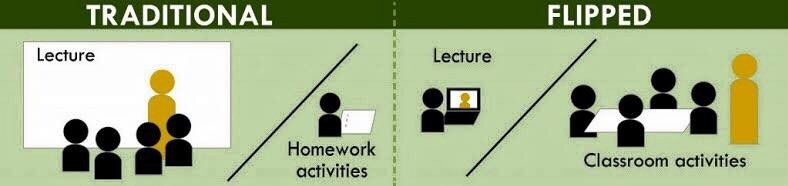
Why traditional lesson time can feel too short
A teacher may spend the first part of a lesson explaining a topic, answering questions, and dealing with different levels of understanding.
By the time students are ready to practice, much of the period has passed.
Students then take the most difficult part home.
They are expected to apply the idea without the teacher beside them.
This can create several problems:
- Students practice the wrong method.
- Students become stuck and stop working.
- Students copy an answer without understanding it.
- Students wait until the next lesson to ask for help.
- The teacher spends the next class correcting misunderstandings.
A flipped approach can move the first introduction into a short resource and protect classroom time for guided practice.
It does not remove the need for explanation.
It changes when some explanation happens and gives the teacher more time to support students while they work.
Begin with the part students find difficult
Do not flip a lesson simply because a video is available.
Start with a learning problem.
Ask:
- Which part of this topic is difficult to explain in one group discussion?
- Where do students need more practice?
- Which task would benefit from teacher feedback?
- Which students need more time or another example?
- What do students usually misunderstand when they work alone?
For example, a teacher may notice that students can copy the steps of a calculation but cannot explain why the method works.
The pre class resource can introduce the method. Classroom time can then focus on comparing approaches, explaining reasoning, and correcting common errors.
A flipped classroom works best when it creates more time for the learning that needs human support.
Keep the first resource short
A pre class resource does not need to cover the entire lesson.
A short resource may focus on one idea, one skill, or one example.
A useful resource should answer three questions:
- What is this topic about?
- What should I notice?
- What will I do with this idea in class?
A teacher can create a short video with a voice recording and a simple visual.
A written resource can work just as well when it includes clear examples and questions.
Avoid creating a long recording that feels like another lecture.
A short resource is easier for students to complete and easier for teachers to update.
Five practical formats for flipped learning
1. The short explanation
Explain one idea in plain language.
Use one example and end with a question students should bring to class.
2. The worked example
Show how to solve one problem. Leave one step unfinished so students can try it during the lesson.
3. The observation task
Ask students to watch, read, or examine something and record what they notice.
This can work well for science, art, history, geography, and language lessons.
4. The vocabulary guide
Introduce key words before the lesson. Ask students to use each word in a question or sentence.
5. The preparation checklist
Give students a short list of what to bring, read, calculate, research, or consider before the practical lesson.
The format should match the learning purpose.
A video is not automatically better than a written guide.
Give students a reason to prepare
Students are more likely to complete a pre-class resource when they understand how it will help them.
Do not say only:
Watch this video before the next lesson.
Explain what will happen next:
Watch this short explanation and bring one question.
In class, you will use the method to solve three problems and compare your approach with a partner.
Students need to know that preparation will make the classroom activity easier, more interesting, or more successful.
A short preparation check can include:
- One question to answer
- One example to complete
- One word to define
- One prediction to make
- One part that remains unclear
This gives the teacher information before the lesson begins.
Plan the classroom activity before making the resource
One common problem is creating a video first and then deciding what students should do in class.
Reverse the process.
First plan the classroom activity.
Ask:
- What will students make, solve, discuss, or practice?
- What support will they need?
- What errors are likely?
- Which examples should be ready?
- How will I know whether they understand?
Then create the pre-class resource to prepare students for that activity.
For example, if the classroom task is a science investigation, the pre-class resource may explain the safety steps and key vocabulary.
The lesson can then focus on observation, measurement, discussion, and analysis.
If the classroom task is an essay workshop, the pre-class resource may show how to identify a main idea.
The lesson can then focus on building paragraphs, reviewing examples, and improving student writing.
Use the first minutes to check understanding
Do not assume that students understood the pre-class resource.
Begin with a short check.
You can ask students to:
- Explain the main idea to a partner
- Complete one simple example
- Identify the step they found difficult
- Sort statements into correct and incorrect groups
- Write one question
- Show their confidence with a quick response
Use the answers to adjust the lesson.
If many students are confused, give another explanation before moving to the main activity. If most students are ready, use the time for deeper practice.
A flipped classroom gives the teacher more flexibility, but only when the teacher checks what students actually know.
Make classroom time practical
The classroom should not become another lecture after the pre-class resource.
Use the period for activities that benefit from teacher presence.
Problem solving workshop
Students work through problems while the teacher identifies patterns and gives feedback.
Collaborative investigation
Groups collect information, test an idea, or create a shared explanation.
Demonstration and practice
The teacher models a skill, then students practice it while support is available.
Discussion and debate
Students use the pre-class resource as a starting point for questions, evidence, and different viewpoints.
Creation task
Students produce a model, presentation, explanation, design, experiment, or written response.
Feedback studio
Students review early work and make a specific improvement.
The practical activity should not be busy work. It should help students use, question, or improve the idea introduced before class.
Use technology where it improves the learning experience
A flipped classroom can work with simple resources. It does not require an expensive technology programmed.
However, classroom technology can make preparation and practice easier.
An interactive display can help a teacher:
- Show a worked example
- Annotate student responses
- Compare different solutions
- Display a group’s research
- Model a process
- Save the class summary
- Show a video or diagram
- Collect quick responses
C3 iT Xperts’ Classroom Tech solutions can support schools that want to connect interactive displays, digital lessons, audio, projectors, and classroom resources.
Technology should serve the lesson. If a tool creates more steps than value, use a simpler option.
Plan for students who cannot prepare at home
A flipped classroom must not create a disadvantage for students who have limited access to devices, internet, quiet study space, or family support.
Provide alternatives.
Students may complete the resource:
- At school before the lesson
- During a study period
- In a library or computer room
- Through a printed version
- With an audio file
- With a downloaded copy
- In a supported small group
Do not punish students for access problems.
A short classroom recap can bring everyone to a common starting point. The goal is preparation, not exclusion.
Teachers should also consider language, reading level, captions, screen size, and accessibility needs.
A flipped classroom is stronger when every student has a realistic way to participate.
Help students manage responsibility
Some students need support learning how to prepare independently.
Teach them how to:
- Find the assigned resource
- Choose a suitable time to complete it
- Take brief notes
- Pause and replay an explanation
- Write down a question
- Ask for help when access is difficult
- Bring evidence of preparation to class
Do not expect students to develop these habits instantly.
Start with a small routine. For example, students might watch or read one short resource and complete one question.
As they become more confident, the task can become more independent.
Families should also receive a clear explanation. Parents do not need to teach the lesson at home.
They need to understand what students are expected to do and how to ask for support.
Make the classroom feel active, not confusing
Practical learning needs structure.
Students should know:
- What they are learning
- What they are doing
- Who they are working with
- What resources they can use
- What a successful result looks like
- When they should ask for help
- How the work will be checked
Display the steps clearly. Use a timer when helpful.
Give each group a role. Model the first example before students work alone.
An interactive flat panel can display the instructions, examples, questions, and progress checks in one shared place.
Good classroom management remains important.
Flipped learning is not a reason to remove structure.
Use group work carefully
Group work can make flipped lessons more active, but it needs planning.
Give students roles such as:
- Reader
- Recorder
- Resource manager
- Questioner
- Presenter
- Checker
Change roles over time so the same student is not always leading or writing.
Provide a task that requires each person to contribute.
A group should not be able to complete the whole activity while one student watches.
The teacher should move around the room, listen to explanations, ask questions, and identify students who need support.
The goal is not simply to make the classroom louder.
The goal is to make student thinking more visible.
Assess learning during the lesson
Assessment in a flipped classroom should happen before, during, and after the practical activity.
Before class
Use one question, short quiz, or preparation check to see whether students met the resource.
During class
Listen to explanations. Review group work. Ask students to show the next step. Check whether students can apply the idea in a new example.
After class
Use an exit question, short reflection, or completed product.
Useful questions include:
- What did you understand better today?
- Which step was difficult?
- What would you try next time?
- What question do you still have?
The answers help the teacher plan the next lesson.
What teachers can do when students do not prepare
Students may arrive without completing the resource.
Avoid turning the lesson into a punishment session.
Instead:
- Provide a short catch-up resource.
- Pair the student with a supportive partner.
- Give a simple starting task.
- Explain why preparation helps the practical activity.
- Speak privately with students who face repeated barriers.
The teacher may also need to review the resource. Was it too long? Was the instruction unclear? Was the task accessible? Did students know what to do with the information?
A flipped classroom improves through adjustment.
How principals can support a flipped classroom programmed
School leaders should not ask teachers to flip every lesson immediately.
Begin with a clear purpose.
Possible goals include:
- More time for guided practice
- Better student discussion
- Stronger revision routines
- More personalized teacher support
- More practical project work
- Better use of classroom technology
Provide teachers with:
- Planning time
- Simple templates
- Examples from different subjects
- Support for video and audio creation
- Guidance on accessibility
- Alternatives for students without home access
- A way to share successful resources
- Time to review what worked
Professional development should focus on lesson design, not only on recording software.
Use a simple flipped lesson template
Teachers can use this template when planning.
Before class
- What should students know first?
- What is the shortest useful resource?
- How can students access it?
- What question should they bring?
During class
- How will I check preparation?
- What will students practise or create?
- What support will I provide?
- How will students work together?
- What evidence of learning will I collect?
After class
- What did students understand?
- Which part caused confusion?
- What should be reviewed?
- What resources can be improved or reused?
This template keeps planning manageable.
Create better resources from existing lessons
Teachers do not need to start from an empty screen.
A lesson plan can become a short explanation.
A textbook section can become a reading guide.
A classroom demonstration can become a recorded example.
A common question can become a revision resource.
For more ideas, read How Smart Schools Turn One Lesson Into Five Learning Resources.
The resource should be shorter and clearer than the original lesson. Remove information students do not need yet.
Use headings, examples, diagrams, captions, and questions to make the resource easy to follow.
Common problems and practical responses
Students do not complete the resource
Make it shorter, explain its purpose, and provide a supported access option at school.
The resource feels like a long lecture
Reduce the amount of explanation. Keep one idea and one example. Move the deeper discussion into the classroom.
Students arrive with different levels of preparation
Begin with a quick check and provide different starting tasks.
Families are confused
Send a short explanation of what students need to do and who to contact for help.
Teachers spend too much time creating videos
Reuse existing materials. Use voice recordings, diagrams, or written guides when they are more efficient.
Group work becomes noisy but unproductive
Define roles, show the expected result, and check progress during the activity.
Technology does not work
Keep a low technology backup. Save resources locally and make sure the lesson can continue without one tool.
How to measure whether flipped learning is helping
Do not measure success only by the number of videos created.
Look for changes in learning and classroom use.
Student indicators
- Are students asking better questions?
- Can they explain ideas in their own words?
- Are they using classroom time for meaningful practice?
- Are they improving work after feedback?
- Are more students contributing to discussion?
Teacher indicators
- Is there more time for individual support?
- Are common misunderstandings easier to identify?
- Are resources being reused?
- Is lesson planning becoming more manageable?
- Do teachers feel more confident adjusting instruction?
School indicators
- Are teachers sharing resources across departments?
- Are students with access barriers receiving alternatives?
- Is technology supporting the school improvement plan?
- Are families receiving clear communication?
- Is professional development connected to classroom practice?
Use student work, teacher feedback, observation, preparation checks, and reflections together.
A practical rollout plan
Choose one topic
Select a topic that would benefit from more classroom practice or feedback.
Create one short resource
Use a video, reading, diagram, audio explanation, or worked example.
Add one preparation question
Ask students to write one answer, question, prediction, or example.
Plan active classroom work
Use the lesson for practice, discussion, creation, problem-solving, or feedback.
Review the evidence
Look at student work and ask what improved.
Adjust the resource before using the approach again.
Start with one class or one subject.
Expand after teachers have a manageable routine.
Frequently asked questions
What is the main idea of a flipped classroom?
Students meet the basic content before the main lesson, and classroom time is used for practice, discussion, problem solving, creation, and feedback.
Does flipped learning mean students must watch videos at home?
No. Students can use a reading, diagram, audio explanation, worked example, or supported resource at school. The method should not depend on one format.
Is a flipped classroom suitable for primary students?
Yes, when the resource is short, clear, age appropriate, and supported by an adult. Younger students may need to complete preparation in class or with family guidance.
What if students do not have internet access at home?
Provide printed resources, downloaded copies, school access, audio options, or a short catch-up period. Students should not be excluded because of home access.
How long should a flipped classroom video be?
There is no perfect length. Keep it only as long as needed to explain one useful idea. A short, focused resource is usually easier to complete and review.
Can a smart board or interactive panel support flipped learning?
Yes. Teachers can use it to check preparation, display examples, annotate student work, compare answers, guide practical tasks, and save class summaries.
Explore C3 iT Xperts’ Classroom Tech solutions.
How can teachers assess flipped learning?
Use a preparation question, observation during the practical activity, student work, an exit question, and a short reflection. Assessment should focus on understanding and application.
How can principals support teachers?
Provide time, templates, training, access alternatives, examples, and practical feedback. Start with a small pilot instead of asking teachers to flip every lesson.
Does flipped learning work for every topic?
Not always. Use it when students will benefit from more classroom practice, discussion, feedback, or application. Keep a traditional structure when it is simpler and more effective.
About the Author

Manoj Sundaram
Founder @ C3 iT Xperts
I help K–12 leaders turn "dusty" classroom tech into a daily teaching habit. 18 years and 11,000 classrooms have taught me that the best tech is the tech that "disappears" into the teaching rhythm.
18+
Years Experience
11k+
Classrooms
50k+
Educators Impacted
.jpg)