.png?width=1322&height=350&name=C3ITXperts-logo-R%20(1).png "C3ITXperts-logo-R (1)")


Updated August 19th 2026
A school leader opens three vendor proposals.
Every proposal says the same things:
- 4K display
- Multi touch
- Android
- Digital whiteboard
- Wireless sharing
- Classroom collaboration
- Smart learning
The prices are different. The product names are different. The promises sound almost identical.
Then the important question appears:
Is the interactive whiteboard market helping schools choose better technology, or simply giving schools more specifications to compare?
The market is not only moving from old whiteboards to digital boards.
It is moving from isolated screens to connected teaching systems.
That shift matters for principals, school owners, academic coordinators, IT teams, teachers, and technology suppliers.
The first generation of interactive whiteboards focused on replacing the physical board. Today’s interactive flat panels are expected to do much more.
They connect to teacher devices, cloud content, student work, assessment tools, remote participants, and school wide device management.
But more capability also creates more buying risk.
A school can purchase an advanced panel and still end up with:
- Low teacher adoption
- Unused software
- Poor audio
- Weak Wi-Fi
- Confusing logins
- Disconnected content
- High support costs
This guide explains the major interactive whiteboard market trends in 2026, what is changing in school technology, and how buyers can select a system that works in real classrooms.
What is an interactive whiteboard?
An interactive whiteboard is a large digital surface that allows teachers and students to display, write on, move, share, and work with digital content.
Earlier systems often used:
- A projector
- A computer
- A special board surface
- A stylus or pen
- Calibration software
Modern interactive flat panels often combine the display, touch surface, speakers, computer functions, and whiteboard software in one unit.
Depending on the model, users may be able to:
- Write with a pen or finger
- Erase with a palm
- Move and resize objects
- Display videos and images
- Browse approved online content
- Share screens wirelessly
- Open documents and presentations
- Save annotations
- Run quizzes or polls
- Connect remote participants
The important distinction is that the product category is changing.
A school is no longer choosing only a board.
It is choosing a classroom interface.
The biggest shift: from interactive whiteboards to interactive flat panels
Traditional interactive whiteboards usually depended on a separate projector and computer.
Interactive flat panels place the display and touch experience together.
This can reduce some classroom problems:
- No projector lamp replacement
- Fewer shadow problems
- Less calibration work
- Brighter images in many rooms
- Easier direct writing
- More built-in connectivity
- A simpler wall-mounted setup
However, interactive flat panels do not automatically create better teaching.
They can still be used as passive screens.
The change is not only hardware. It is the way schools design lessons, train teachers, manage content, and support daily use.
For schools comparing the two approaches, see Interactive Projectors vs. Smartboard: Which Is Better?.
Five interactive whiteboard market trends shaping 2026
1: Schools are buying ecosystems, not isolated devices
The display is now connected to a larger technology environment.
A school may expect the panel to work with:
- Teacher laptops
- Chromebooks
- Tablets
- Google Workspace
- Microsoft tools
- Learning management systems
- Cloud storage
- Digital content
- Student response tools
- Device-management platforms
This changes the buying question.
Instead of asking, Which board has the most features?
school leaders should ask, Which system fits the tools we already use?
A display that does not fit the school’s workflow creates extra work for teachers and IT teams.
2: Interactive flat panels are becoming the default comparison
Many school buyers now compare interactive flat panels rather than projector-and-board combinations.
The reasons include:
- Easier installation
- Less maintenance in some environments
- Direct touch interaction
- Clearer display quality
- Integrated speakers
- Built-in software
- Support for wireless sharing
But the shift creates a new risk: schools may compare panels only by screen size and discount.
The market is becoming more competitive, not automatically more simple.
Buyers still need to compare software, support, viewing conditions, teacher adoption, device management, and total cost.
3: The software layer is becoming more important
A panel is valuable when teachers can use it to create a useful lesson workflow.
The software layer may support:
- Digital whiteboarding
- Annotation
- Lesson templates
- Cloud access
- Screen sharing
- Student collaboration
- Formative quizzes
- Saved lesson work
- Recording
- Content libraries
The software may be included, limited, or subscription-based.
Schools should ask:
- Which features are included permanently?
- Which features require annual payment?
- Are licenses per device, teacher, or student?
- Can teachers export and reuse their work?
- What happens if the school changes brands later?
- Can the software connect with current school systems?
A beautiful panel with an unsuitable software layer can become a frustrating purchase.
4: The market is moving toward cloud connected teaching
Teachers need to prepare lessons in one place and use them in another.
A cloud-connected workflow can help teachers:
- Open lessons from different classrooms
- Share resources with colleagues
- Save annotations
- Reuse strong explanations
- Give students access after class
- Protect lesson content when staff change
Cloud connection also creates responsibility.
The school should decide:
- Who owns the accounts?
- Where are lesson files stored?
- How is access controlled?
- What happens when a teacher leaves?
- How is student information protected?
A school should not allow important resources to remain only on one teacher’s personal account or one panel’s internal storage.
5: Buyers are asking more questions about teacher adoption
Earlier buying discussions often focused on specifications.
Now school leaders increasingly ask whether teachers will actually use the technology.
That question is important because technology adoption is not automatic.
A school may have a technically strong panel and still see low usage if:
- Teachers cannot find their files
- The panel is slow to start
- The workflow uses too many applications
- Support is difficult to access
- Training ends after one demonstration
- Leadership has no review process
The strongest market suppliers are not only selling equipment.
They are helping schools think about implementation, training, service, and classroom use.
Market drivers: why schools continue to invest
1. More digital content in everyday teaching
Teachers now use videos, diagrams, simulations, digital textbooks, browser content, presentations, and online activities as part of many subjects.
A large interactive display provides a shared surface for this content.
2. The need for visible collaboration
Schools want students to discuss, create, present, compare, and solve problems together.
A shared interactive surface can support that work when the lesson is designed for contribution.
3. Hybrid and remote learning requirements
Schools may need to connect classrooms with:
- Guest speakers
- Specialist teachers
- Other campuses
- Students who are absent
- Professional-development sessions
This increases interest in cameras, microphones, screen sharing, and cloud tools.
4. Accessibility expectations
Schools are giving more attention to:
- Captions
- Transcripts
- Readable text
- High contrast
- Clear speech
- Multiple response formats
- Hearing support
Interactive classroom technology can support these needs, but only when the school plans for them during selection and training.
For a product-focused comparison, read the C3 guide to the best interactive displays for schools in India.
5. Pressure to demonstrate value
A large technology purchase requires more than an installation report.
School owners and principals want to know:
- Are teachers using the equipment?
- Are lessons becoming easier to deliver?
- Are students participating more meaningfully?
- Is the system reducing or increasing support work?
- Can the school justify the next investment?
This is pushing the market toward adoption measures and implementation support.
Market restraints: what slows adoption?
Cost and total ownership
The panel price is only one part of the cost.
Schools may also pay for:
- Mounting
- Installation
- Network upgrades
- Teacher devices
- OPS computers
- Software licenses
- Training
- Repairs
- Support
- Replacement parts
- Content development
A school should compare the full cost across several years.
Uneven infrastructure
A modern panel cannot compensate for poor Wi-Fi, unstable power, weak cabling, or limited technical support.
Before buying at scale, test the system in the actual classroom environment.
Teacher confidence
Teachers may avoid the technology when it feels risky in front of students.
The school needs short, practical training and a safe way to ask for help.
Digital divide and access
Not every student has the same device, internet connection, home environment, or level of digital confidence.
Schools need inclusive participation routes that do not assume every student has identical access.
Feature overload
More applications and tools can make the experience harder to manage.
Schools should choose a small number of useful workflows before adding advanced features.
How the market is segmented
The interactive whiteboard and interactive display market can be viewed through several practical segments.
By customer
- K–12 schools
- Higher education
- Coaching and tutoring centers
- Government training environments
- Corporate learning and meeting spaces
- Healthcare and specialist training
By technology
- Projector-based interactive boards
- Infrared touch displays
- Electromagnetic systems
- Optical touch systems
- Interactive flat panels
- Large-format non-touch displays with collaboration software
By use case
- Whole-class teaching
- Small-group collaboration
- Corporate presentations
- Remote and hybrid sessions
- Digital whiteboarding
- Training and simulation
- Assessment and feedback
Schools remain a major use case, but the needs are different from corporate meeting rooms.
A classroom display must handle repeated daily use, changing teachers, student interaction, content access, support requests, and different room conditions.
A product that works well in a boardroom may not be the best product for a school.
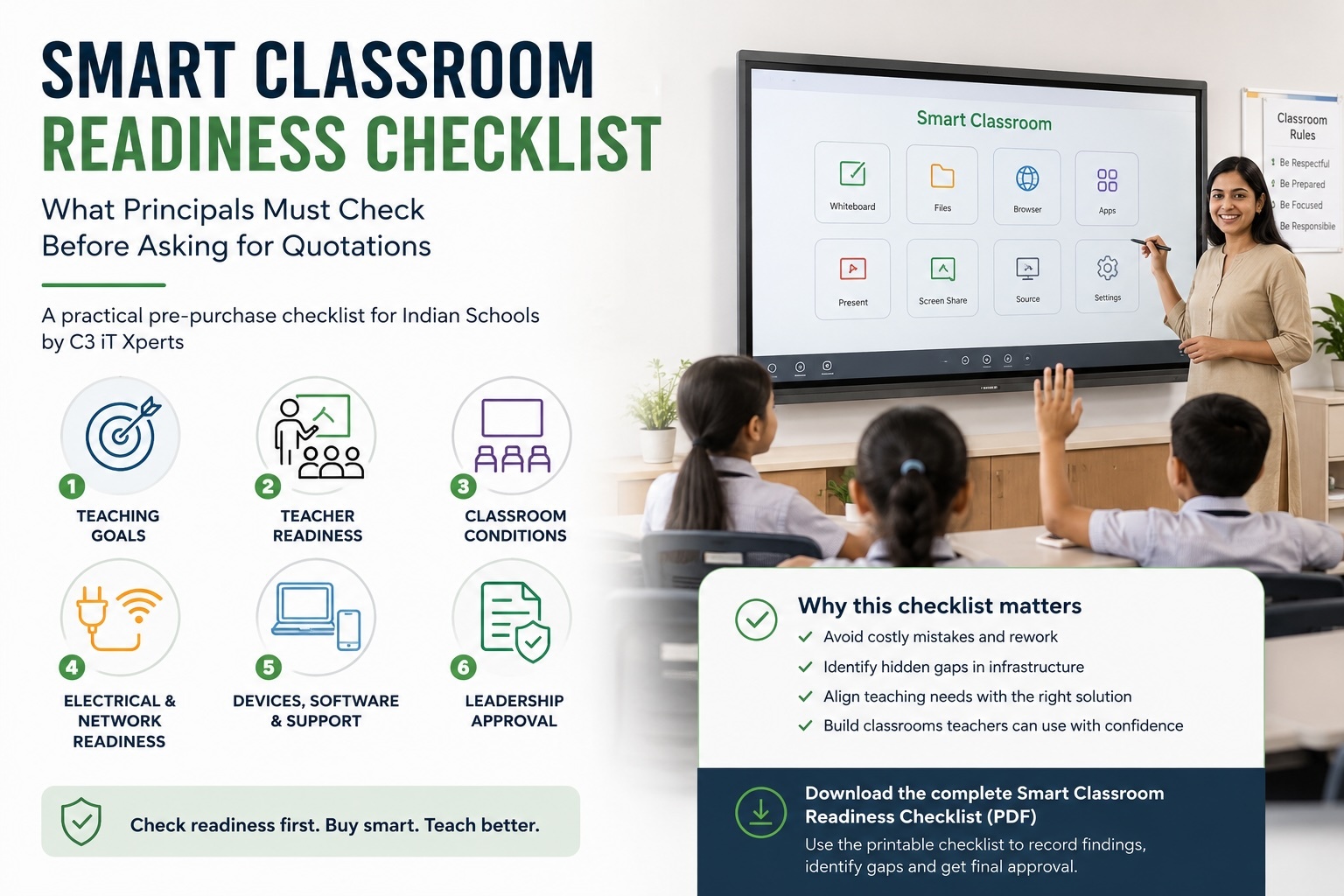
What schools should compare before buying
Display size and visibility
Choose based on room length, seating, content, and viewing distance.
Many schools compare 65 inch, 75 inch, 86 inch, and larger panels.
Test normal text and diagram labels from the back row.
Resolution
4K displays can provide clearer text, diagrams, maps, and video. But the content must also be high quality, and the display must be large enough for the room.
Touch performance
Test:
- Writing accuracy
- Pen response
- Palm rejection
- Erasing
- Object movement
- Multi user interaction
- Edge accuracy
Ports and connections
Check:
- HDMI
- USB
- USB C where appropriate
- Network port
- Wi-Fi
- Bluetooth
- Screen sharing
- Audio connections
Audio
Students should hear teachers, videos, and remote participants clearly.
Test speech from the front, center, and back of the room.
Software
Check whiteboarding, annotation, saving, cloud access, collaboration, quizzes, recording, and license terms.
Device management
For multiple classrooms, ask how IT will manage applications, settings, updates, accounts, and security.
Support
Ask what happens after installation, after warranty, and during an urgent classroom fault.
For more detailed product guidance, see What Are the Typical Specifications for an Interactive Smartboard?.
How to evaluate an interactive whiteboard supplier
Do not judge the market by the quality of a presentation alone.
Ask each supplier to demonstrate a real school workflow:
- Start the panel from a cold start.
- Open a real lesson file.
- Display a PDF, presentation, video, and browser resource.
- Annotate and save the work.
- Connect a teacher device.
- Connect a student device.
- Run a quick poll or response.
- Continue when the internet is unavailable.
- Reset the room for the next teacher.
- Explain the support process.
Test with:
- A technology-confident teacher
- A cautious teacher
- An IT administrator
- A student
- An academic leader
The supplier should be able to explain not only what the product does, but how the school will use and support it.
A 30 day school buying plan
Week 1: Define the school’s problem
Is the school trying to improve:
- Visibility?
- Collaboration?
- Digital content access?
- Teacher explanation?
- Student participation?
- Hybrid learning?
- Accessibility?
- Lesson preparation?
Choose one or two priorities.
Week 2: Create a shortlist
Compare three complete solutions:
- One strong ecosystem option
- One education-focused option
- One value-led option
Compare workflow, software, support, and adoption risk-not only screen size.
Week 3: Run a real pilot
Use the products with real teachers and real lesson files.
Record:
- Start-up time
- File compatibility
- Touch response
- Audio clarity
- Student participation
- Network performance
- Teacher confidence
- Supplier response
Week 4: Decide based on evidence
Ask:
- Will teachers use the system every week?
- Does it fit the school’s existing technology?
- Can IT manage it across classrooms?
- Is the support model clear?
- Is the full cost justified?
The best market choice is not always the cheapest or newest option.
It is the system the school can use, support, and improve.
How C3 can help schools evaluate the market
C3 iT Xperts can support schools with:
- Interactive display comparisons
- Classroom technology audits
- Infrastructure reviews
- Teacher workflow planning
- Proof-of-concept support
- Teacher training
- Adoption reviews
- Long-term classroom technology planning
The C3 classroom technology solutions page provides a broader view of displays, projectors, audio systems, software, and support.
The purpose is not to help schools buy the most technology.
The purpose is to help schools choose technology that teachers and students can use meaningfully.
Frequently asked questions
Is the interactive whiteboard market still growing?
The market continues to evolve as schools and organizations invest in interactive displays, digital content, cloud collaboration, hybrid learning, and classroom technology. The important change is that buyers are moving from isolated boards toward connected classroom systems.
Are interactive flat panels replacing traditional interactive whiteboards?
In many school buying discussions, interactive flat panels are now a major alternative to projector-based interactive whiteboards. They combine display, touch, speakers, and software more closely, but schools still need to compare support, connectivity, and teacher adoption.
What is driving the demand for interactive whiteboards in schools?
Key drivers include digital content, collaborative learning, interactive teaching, hybrid learning, accessibility needs, device sharing, and the desire to make lessons more visible and participatory.
What is holding schools back from buying interactive displays?
Common restraints include cost, limited infrastructure, poor Wi-Fi, lack of teacher training, uncertain support, device access differences, and concerns about whether the technology will be used after installation.
Which is better: an interactive whiteboard or an interactive flat panel?
The right choice depends on the room, teaching workflow, budget, maintenance plan, content, and support model. Interactive flat panels can reduce some projector-related problems, while projector systems may still suit certain large spaces or existing setups.
What is the most important interactive whiteboard feature?
There is no single feature. A school should priorities the complete daily workflow: start-up, visibility, touch, audio, connections, content access, saving, support, and teacher confidence.
How can schools calculate ROI from an interactive display?
Look at repeated teacher use, reduced setup time, stronger participation, saved and reused lesson resources, support costs, and consistency across classrooms. Device uptime alone does not show educational value.
Should schools choose a product with more features?
Not automatically. Choose features that solve a documented classroom problem.
A smaller set of reliable tools is often more useful than a large set of features that teachers rarely use.
About the Author

Manoj Sundaram
Founder @ C3 iT Xperts
I help K–12 leaders turn "dusty" classroom tech into a daily teaching habit. 18 years and 11,000 classrooms have taught me that the best tech is the tech that "disappears" into the teaching rhythm.
18+
Years Experience
11k+
Classrooms
50k+
Educators Impacted