.png?width=1322&height=350&name=C3ITXperts-logo-R%20(1).png "C3ITXperts-logo-R (1)")


Almost every school I visit tells me the same thing.
“We have smart classrooms.”
Then I walk into one of those classrooms.The teacher turns on the Interactive Flat Panel.
Opens a blank whiteboard.
And starts writing.
Just like before.
The blackboard has become a brighter blackboard.
The room looks modern.
The screen is digital.
But has teaching changed?
Not always.
This is where many schools confuse a digital classroom with a smart classroom.
The difference is not the brand of panel.
It is not the screen size.
It is not the Android version.
The real difference is how teaching and learning happen inside the classroom.
A digital classroom uses technology to deliver a lesson.
A smart classroom connects technology with lesson planning, student participation, assessment, and follow-up.
A digital classroom changes the equipment.
A smart classroom changes the learning workflow.
Smart classroom vs digital classroom at a glance
Digital classroom |
Smart classroom |
|
Starts with the device |
Starts with the learning goal |
|
Technology displays information |
Technology supports the full lesson |
|
Students mainly watch and listen |
Students answer, discuss and take part |
|
The teacher uses ready-made content |
The teacher adapts and creates content |
|
Assessment happens separately |
Learning is checked during the lesson |
|
Lessons often end with the bell |
Learning can continue after class |
|
Training explains product features |
Training develops teaching practices |
|
Success is measured by installation |
Success is measured by classroom use and learning |
|
Tools may work separately |
Tools work as part of one teaching workflow |
That is the basic difference.
But for a school planning a major technology investment, the implications are much bigger.
What is a digital classroom?
A digital classroom is a classroom in which digital technology is used to present or deliver teaching content.
The teacher may use:
- an Interactive Flat Panel,
- a projector,
- a presentation,
- an educational video,
- a digital textbook,
- an online worksheet,
- or a learning application.
These tools can make lessons more visual.
They can help teachers show information quickly.
They can also give students access to resources that would be difficult to demonstrate using only a textbook or blackboard.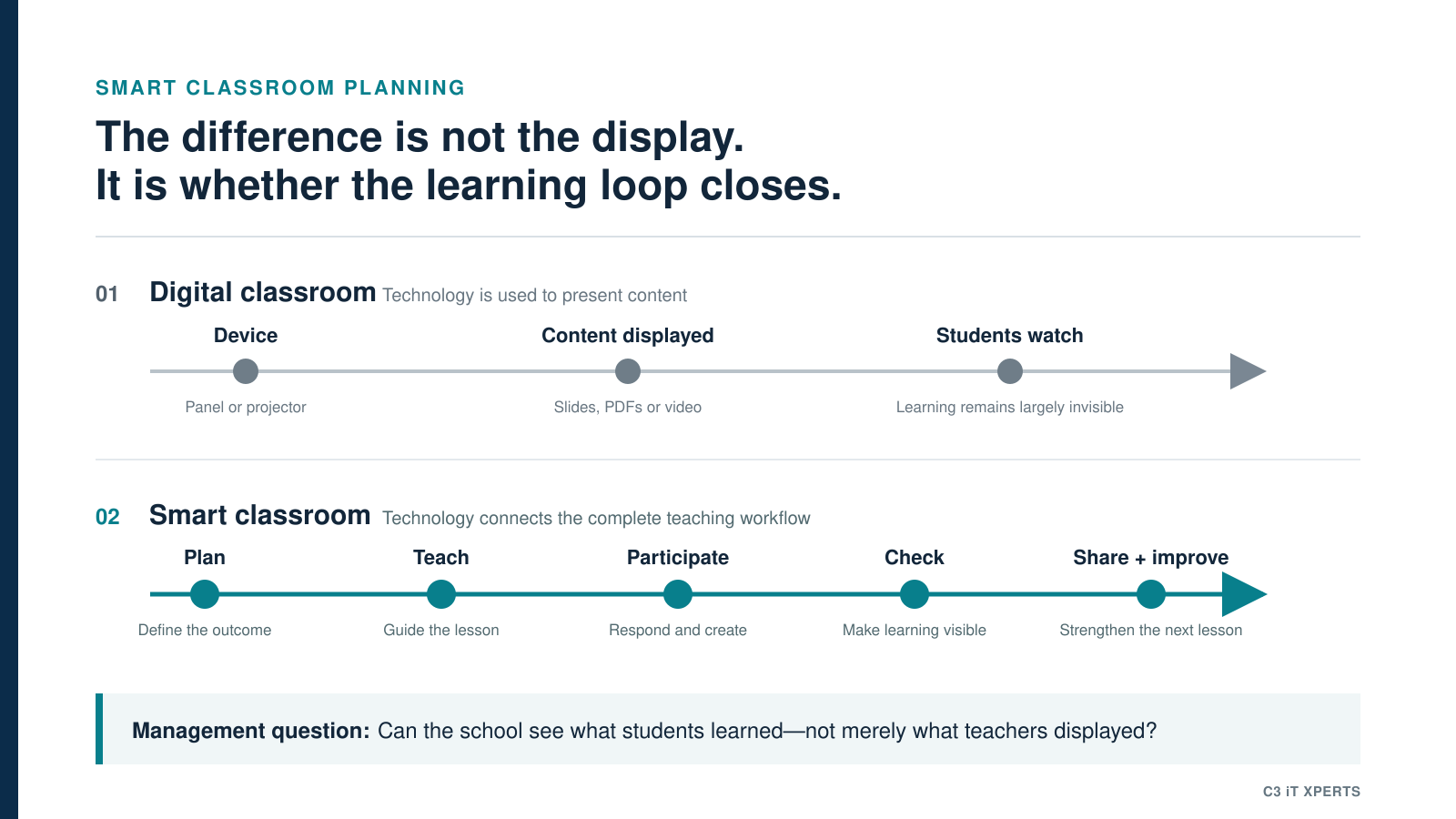
India’s PM e-VIDYA programme also uses video, downloadable material, assessments and online discussion to support multimodal learning. This shows the value digital resources can bring when different formats are used together.
But the presence of digital content does not automatically make the classroom smart.
Consider this lesson:
- The teacher opens a presentation.
- Students look at the screen.
- The teacher explains each slide.
- Students copy the notes.
- The lesson ends.
The teacher has used technology.
But the teaching method has remained almost the same.
The screen has replaced the board.
The presentation has replaced the textbook page.
The digital pen has replaced the chalk.
The equipment has changed.
The learning process has not.
That is a digital classroom.
What is a smart classroom?
A smart classroom uses technology as part of a connected teaching and learning process.
It begins with a learning goal.
The teacher first asks:
What should students understand or be able to do by the end of this lesson?
The teacher then chooses the right method and resource.
During the lesson:
- a visual may explain a difficult idea,
- students may answer questions,
- the teacher may identify misunderstandings,
- an activity may be adjusted,
- learning may be checked,
- and students may receive further support after class.
The technology has a purpose at every stage.
It is not being used simply because it is available.
A smart classroom therefore connects four parts of teaching:
Plan
What should students learn?
What resources will help?
Where may students find the topic difficult?
Teach
How will the idea be explained?
How will students take part?
Check
Have students understood?
Who needs another explanation?
Share
What should students review after class?
Can the lesson be saved, improved and used again?
This is the C3 Plan–Teach–Check–Share framework.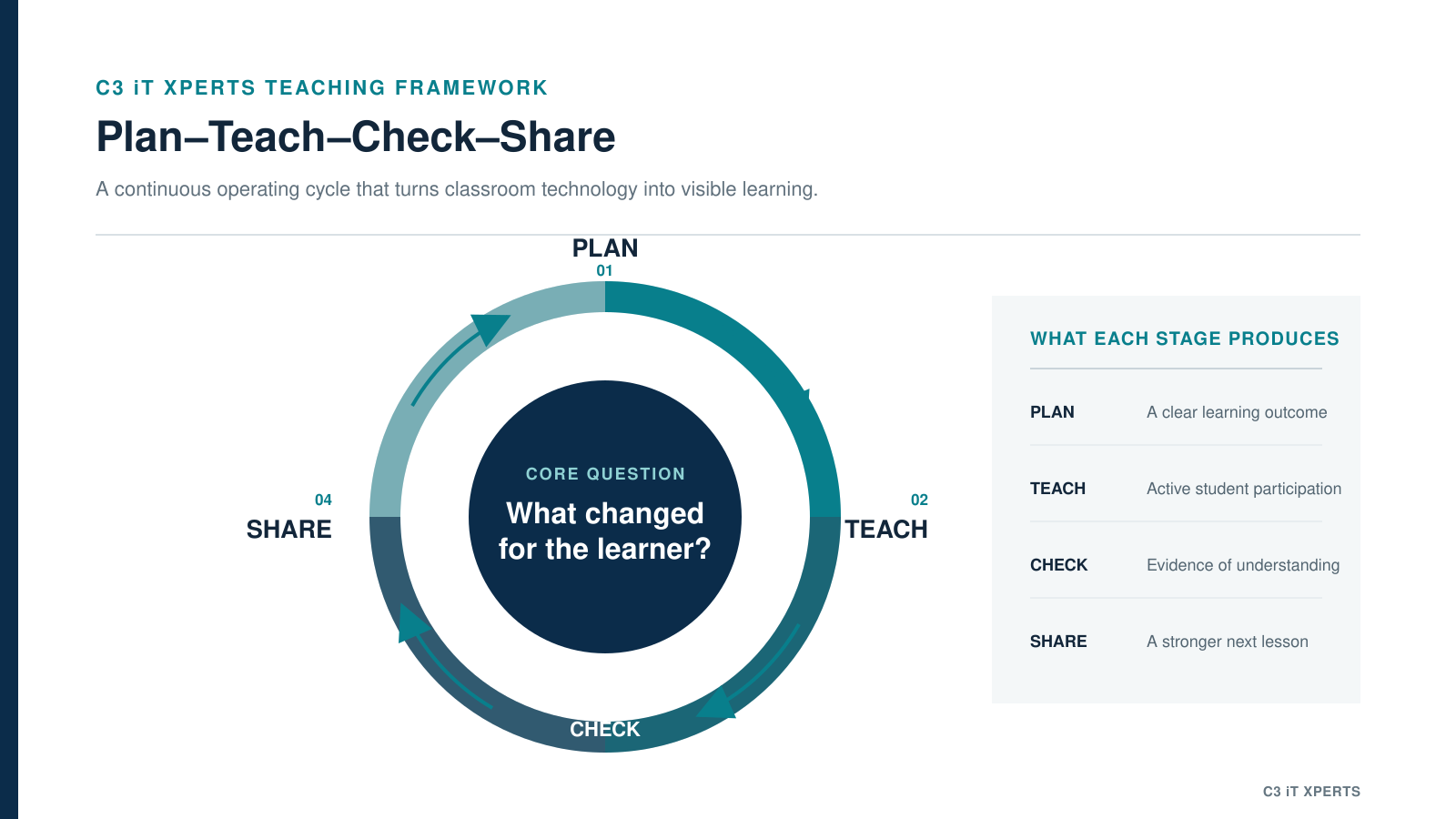
A digital classroom uses a device.
A smart classroom uses a teaching system.
Why do schools confuse the two?
The confusion often begins during the buying process.
A school decides to modernise its classrooms.
Vendors are invited.
Product demonstrations begin.
The conversation quickly becomes technical.
How large is the panel?
How much RAM does it have?
Which operating system does it use?
How bright is the screen?
How many years of warranty are included?
What content comes with the product?
All these questions matter.
But they do not answer the most important question:
How will this purchase improve the way teachers plan, teach, assess, and support students?
When the discussion starts with the product, the project usually becomes an installation project.
When the discussion starts with teaching, it can become a smart classroom project.
The order matters.
The workflow must come before the purchase.
About the Author

Manoj Sundaram
Founder @ C3 iT Xperts
I help K–12 leaders turn "dusty" classroom tech into a daily teaching habit. 18 years and 11,000 classrooms have taught me that the best tech is the tech that "disappears" into the teaching rhythm.
18+
Years Experience
11k+
Classrooms
40k+
Educators Impacted
A smart classroom is not a product
No Interactive Flat Panel can make a classroom smart on its own.
Neither can:
- an LMS,
- an AI tool,
- digital content,
- classroom software,
- student devices,
- or fast internet.
Each may be useful.
But none of them is the complete solution.
A classroom becomes smart when these elements work together around the teacher and the lesson.
That includes:
- reliable infrastructure,
- appropriate classroom technology,
- easy access to teaching resources,
- teacher confidence,
- lesson planning,
- student participation,
- assessment,
- leadership support,
- and ongoing technical and academic help.
India’s PM SHRI programme similarly describes technology integration as part of an enhanced teaching and learning experience—not merely the addition of devices. It combines infrastructure improvement with modern pedagogical practices.
The panel is only one part of that system.
The teacher is still at the centre.
The real difference is the teaching workflow
In many digital classrooms, the lesson begins when the teacher enters the room.
The panel is switched on.
A presentation is opened.
A video is played.
A few points are written on the screen.
The bell rings.
The lesson ends.
The panel was used.
But the lesson was not redesigned.
A smart classroom works differently.
The lesson starts before the teacher enters the room.
The teacher knows the learning goal.
The required content has been organised.
Questions have been planned.
The teacher has considered where students may struggle.
During the lesson, students do more than watch.
They answer.
They discuss.
They compare.
They solve.
The teacher checks what they understand.
When a common mistake appears, the teacher changes the explanation.
After the lesson, the teaching material can be saved.
It can be shared with students.
It can be improved.
It can be used again by the same teacher or another teacher.
Technology now supports the full life of the lesson.
That is the workflow difference.
What we commonly observe in schools
Across our work with schools, we repeatedly see a similar pattern.
Technology is installed first.
Teacher use is discussed later.
Initial training focuses on buttons, menus and product features.
Teachers are shown how to:
- switch on the panel,
- connect a laptop,
- open the whiteboard,
- write on the display,
- play a video,
- and save a file.
This training is necessary.
But it is only product orientation.
It does not automatically answer questions such as:
- How do I use this for tomorrow’s mathematics lesson?
- How can I check whether all students have understood?
- Where should I save my teaching resources?
- How can my department share lessons?
- How do I adapt a ready-made lesson?
- How can I continue the activity after class?
- Who will help me when I get stuck?
When these questions remain unanswered, teachers often return to the simplest use of the panel.
Writing.
Presentations.
Video playback.
This does not mean the teachers are unwilling.
It often means the school has not created a simple enough system for regular use.
The problem is not always the teacher.
Sometimes, the problem is the workflow.
The teacher should not need five systems for one lesson
Many schools interpret the word “ecosystem” as a collection of applications.
One tool is used to prepare the lesson.
Another is used to display it.
Another is used for assessment.
Another is used to share files.
Another is used to communicate with students.
Each system has a different login.
Each follows a different process.
The school may technically have many capabilities.
But the teacher now has more work.
That is not a useful ecosystem.
A useful teaching ecosystem makes the flow simpler.
The teacher should be able to move naturally from:
Plan → Teach → Check → Share
without rebuilding the lesson in different platforms.
Teachers do not wake up wanting another login.
They want tools that help them teach.
When technology reduces work, teachers are more likely to use it.
When technology adds steps, it becomes easier to avoid.
Why teacher-created content matters?
Many smart classroom packages come with ready-made content.
Ready-made content can help teachers begin.
A video may provide a clear visual.
A diagram may save preparation time.
A simulation may make an abstract concept easier to explain.
But no content company knows a class as well as its teacher.
The content provider does not know:
- what students found difficult yesterday,
- which local example will make sense,
- how quickly the class is learning,
- which language support students need,
- or how the teacher prefers to explain the topic.
The teacher knows these things.
That is why ready-made content should support the teacher.
It should not control the lesson.
A teacher should be able to:
- open a resource,
- remove what is not needed,
- add a local example,
- insert a question,
- include an activity,
- save the lesson,
- and improve it the next time.
Over time, the school starts building an internal teaching resource bank.
It contains:
- lessons,
- explanations,
- activities,
- assessments,
- local examples,
- revision material,
- and subject knowledge created by its own teachers.
This is more valuable than a large content library that teachers rarely adapt.
A smart school does not only buy content. It builds teaching knowledge.
Two teachers. The same technology. Two different classrooms.
Imagine two teachers teaching the same science topic.
Classroom one
The teacher turns on the Interactive Flat Panel.
A video is played.
The teacher writes five points on the screen.
Students copy the notes.
The lesson ends.
The technology was used.
Classroom two
Before class, the teacher sets a clear learning goal.
At the beginning of the lesson, students share what they already know.
The teacher uses a short animation to explain the concept.
Students answer a question on the panel.
Their answers reveal a common misunderstanding.
The teacher changes the explanation and uses another example.
Before the lesson ends, students complete a short learning check.
The teacher identifies who needs further support.
A revision resource is shared after class.
Both classrooms used the same type of screen.
But they did not create the same learning experience.
The difference was not on the wall.
The difference was in the lesson.
A real example: Shraddha Children’s Academy
One example that illustrates this difference is our work with Shraddha Children’s Academy in Chennai.
The school already had Interactive Flat Panels.
The panels had been purchased from different vendors.
The challenge was not simply the availability of hardware.
The school needed a more connected teaching process.
It needed clarity around:
- how teachers prepared lessons,
- where teaching resources were stored,
- how resources could be shared,
- how the panels could support more than writing and video playback,
- how student learning could be checked,
- and how teachers would receive continued support.
We did not begin by recommending that every existing panel be replaced.
We began by studying the workflow.
We looked at how teachers were currently planning and delivering lessons.
We reviewed the available infrastructure and applications.
We identified the gaps between the technology that was present and the way it was being used.
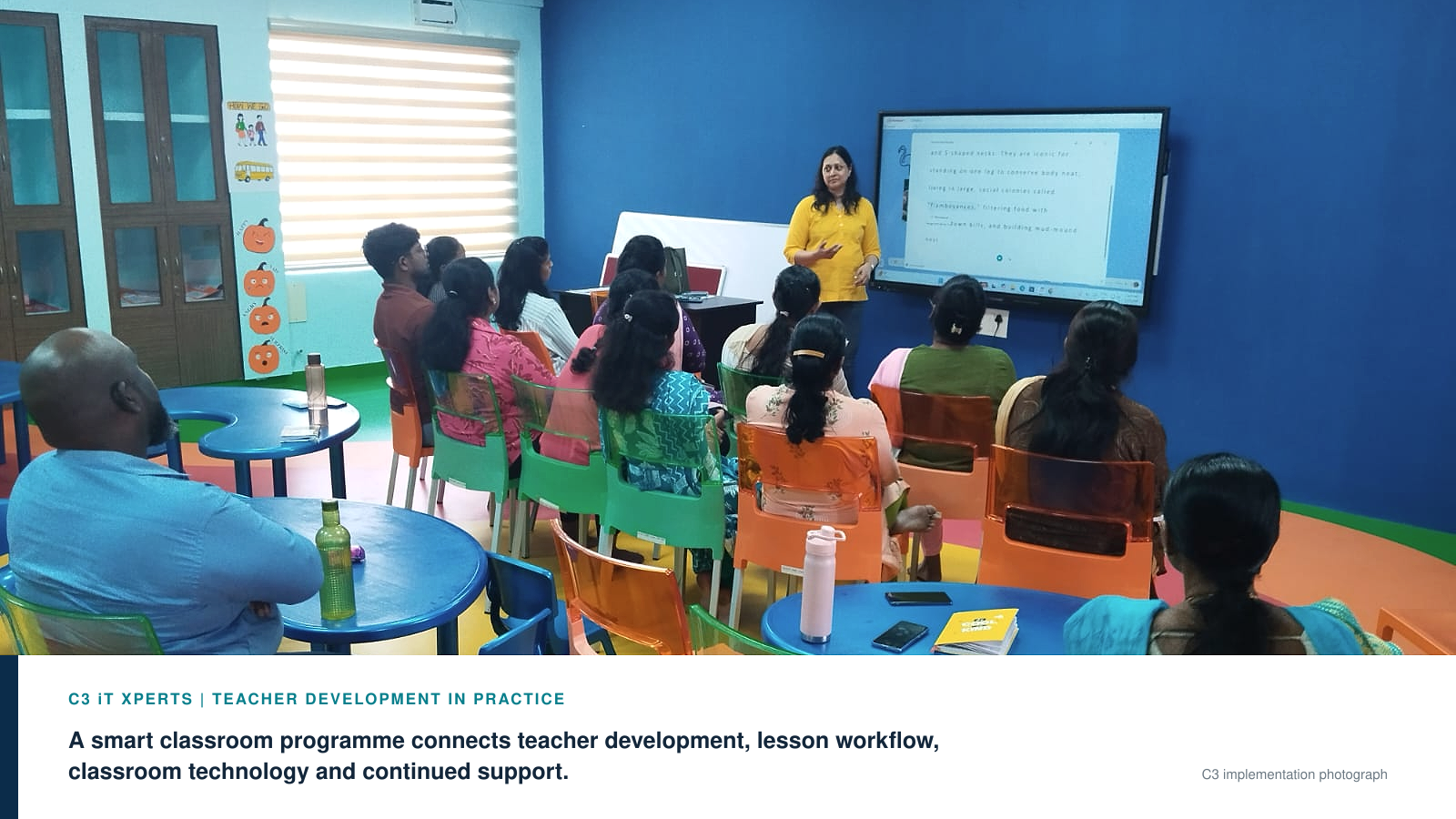
The next stage focused on teacher development and building repeatable practices.
Teachers began organising lesson folders.
They started developing and adapting teaching resources.
They added assessments and classroom activities.
Useful material could be saved, shared and improved.
The school also began creating internal capacity so teachers could receive support beyond the initial vendor training.
The important shift was not that the screens suddenly became more advanced.
The school started treating classroom technology as a teaching programme rather than a hardware installation.
That is the shift from digital to smart.
How can a school identify what it has today?
School leaders do not need a complicated audit to begin.
Walk into a few classrooms and observe what happens.
Ask these questions.
Is the technology mainly being used to display?
If most lessons involve presentations, videos and digital writing, the classroom is primarily digital.
Are students actively participating?
Look for questioning, problem-solving, discussion, collaboration and student responses.
Is learning being checked during the lesson?
The teacher should be able to see whether students have understood before moving ahead.
Are teachers creating or adapting resources?
If every teacher depends entirely on vendor-supplied content, teacher ownership may remain limited.
Are lessons saved and reused?
A strong system should help the school retain the work teachers create.
Is there one simple workflow?
Teachers should know how to prepare, teach, assess and share without moving through several disconnected tools.
Is support available after installation?
One product demonstration is not an adoption programme.
The answers will tell you more than a hardware inventory will.
How should school leaders measure success?
Many schools measure:
- how many panels were installed,
- how many teachers attended training,
- how often the screens were switched on,
- or how much digital content was provided.
These are implementation indicators.
They do not prove that teaching improved.
A screen may remain on for six hours.
That does not mean it supported six hours of meaningful learning.
Schools should look for stronger indicators.
For example:
- How many teachers use the technology regularly?
- How many lessons include student participation?
- Are teachers creating and sharing resources?
- Are formative checks being used?
- Are department resource banks growing?
- Are teachers spending less time searching for material?
- Can new teachers access previous lesson resources?
- Are academic coordinators observing better lesson practices?
- Are students receiving useful material after class?
Measure teaching use. Not screen time.
The purpose of the panel is not to remain busy.
The purpose is to make teaching and learning better.
Digital classroom or smart classroom: which one does a school need?
A digital classroom can be a useful first step.
Schools do not need to dismiss it.
Digital displays, videos and presentations can improve access to information and make explanations more visual.
The problem begins when the school mistakes this first step for the final outcome.
A school should aim for a smart classroom when it wants technology to support:
- lesson preparation,
- active teaching,
- student participation,
- formative assessment,
- resource sharing,
- teacher collaboration,
- revision,
- and continuous improvement.
The decision is therefore not between two types of screens.
It is between two approaches.
One approach installs technology.
The other builds a teaching system around it.
Questions to ask before approving a smart classroom budget
Before approving the next classroom technology project, ask:
- What teaching problem are we trying to solve?
- What should teachers be able to do more easily?
- What should students be able to do differently?
- How will the technology fit the lesson workflow?
- Where will teaching resources be stored?
- Can teachers create and adapt lessons?
- How will learning be checked?
- What training will happen after product orientation?
- Who will support teachers during regular classroom use?
- How will the school measure adoption after six months?
These questions move the conversation away from product specifications.
They bring it back to teaching.
Final thought
Years from now, nobody in the school will remember how much RAM the panel had.
They will not remember its Android version.
They may not even remember the product demonstration.
But teachers will remember whether the technology made their work easier.
Students will experience whether it made lessons better.
Technology does not become valuable when it is installed.
It becomes valuable when the teacher stops thinking about the technology—
and starts thinking only about the lesson.
That is the real difference.
A digital classroom changes the equipment. A smart classroom changes the learning.
FREQUENTLY ASKED QUESTIONS
What is the main difference between a digital classroom and a smart classroom?
A digital classroom uses technology to display or deliver content. A smart classroom connects technology with lesson planning, student participation, assessment, resource sharing and continued learning. The difference lies in the teaching workflow, not merely in the device.
Is an Interactive Flat Panel enough to create a smart classroom?
No. An Interactive Flat Panel is one part of a smart classroom. The school also needs reliable infrastructure, suitable software, organised teaching resources, teacher development, leadership support and a clear plan for classroom adoption.
Can a classroom be digital without being smart?
Yes. A classroom may use presentations, videos and digital writing while following the same teacher-led method used earlier. Technology is present, but the teaching process has not significantly changed.
What makes a classroom genuinely smart?
A classroom becomes smart when technology helps teachers plan lessons, explain concepts, involve students, check understanding, adapt teaching, save resources and continue learning after class.
How can a school measure smart classroom success?
Schools should measure regular teacher use, student participation, lesson creation, formative assessment, resource sharing and improvements in the teaching workflow. Screen power-on time alone is not a useful measure of learning impact.
Should schools buy hardware before planning teacher training?
No. Teacher use, classroom workflow, infrastructure and continued support should be planned before the hardware purchase. The workflow should guide technology selection.
- digital classroom,
- SchoolLeadership,
- Edtech India,
- Smart Classroom Adoption,
- EdTech Leadership India,
- Smart Classroom India
.jpg)