.png?width=1322&height=350&name=C3ITXperts-logo-R%20(1).png "C3ITXperts-logo-R (1)")


Updated August 20th 2026
Schools and businesses are investing in interactive whiteboards. But many still choose them by screen size, touch points, and price.
The real question is simpler:
Will this display improve learning, collaboration, or customer experience?
An interactive display is valuable only when it helps people understand, decide, or act.
The market has changed. Buyers now compare connected systems that combine hardware, software, cloud access, collaboration, content, support, and measurable outcomes.
That experience might be a lesson, a customer demonstration, a product configuration, a design review, a training session, or a collaborative meeting.
This guide explains the interactive whiteboard market in 2026, the trends influencing demand, the opportunities for schools and businesses, and the questions buyers should ask before choosing a system.
The goal is not to predict a market number without reliable current evidence.
The goal is to help decision-makers understand where value is moving and how to make a better investment.
What is the interactive whiteboard market?
The interactive whiteboard market includes the hardware, software, accessories, services, and support used to create interactive digital workspaces.
The market may include:
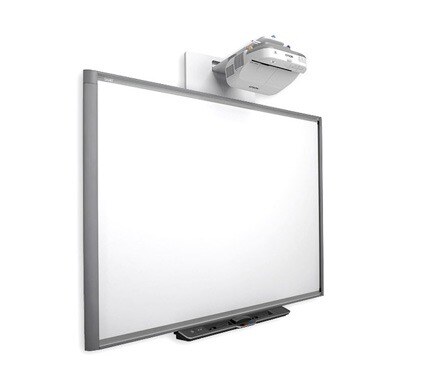
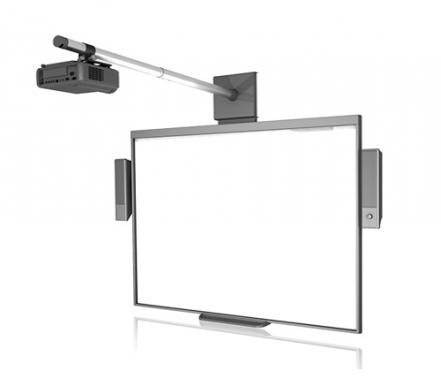
- Projector based interactive whiteboards
- Interactive flat panel displays
- Large touch displays
- Digital whiteboard software
- Wireless presentation tools
- Cloud collaboration platforms
- Digital lesson content
- Student response systems
- Customer facing kiosks
- Interactive showroom displays
- Installation and integration services
- Training and support
The market serves several customer groups:
- K–12 schools
- Universities and colleges
- Coaching and training centers
- Government and public-sector organizations
- Corporate meeting and training spaces
- Retail stores and showrooms
- Exhibitions and events
- Architectural, engineering, and construction firms
- Healthcare and specialist training environments
The needs are different in each segment.
A school cares about daily teacher use, student participation, safety, and long-term support.
A showroom cares about product discovery, customer experience, and conversion.
An AEC company cares about 3D models, design review, and stakeholder collaboration.
A corporate team cares about meeting flow, remote participation, document sharing, and decision speed.
The best market opportunity comes from matching the system to the user’s real problem.
Why the market is changing
From display hardware to experience design
Earlier buying decisions often focused on the screen and projector.
Today, buyers ask what happens around the screen.
Can users:
- Access the right content quickly?
- Work together in real time?
- Save and share their work?
- Connect different devices?
- Use the system without specialist support?
- Continue the workflow when the internet fails?
This is a shift from product thinking to experience thinking.
From one way presentation to shared interaction
A traditional display shows information.
An interactive system allows people to work with information.
Users can move objects, annotate content, compare ideas, configure products, review evidence, or present a decision.
This does not mean every meeting or lesson should be interactive.
It means the technology can support a two-way experience when the use case requires it.
From installation to adoption
A supplier may install the equipment correctly, but adoption still depends on the people using it.
The market is therefore creating more demand for:
- Training
- Workflow design
- Content preparation
- Device management
- Support contracts
- Adoption reviews
- Integration with existing software
A display that is rarely used has a weak commercial value, regardless of its technical quality.
Six important interactive whiteboard market trends in 2026
1: Interactive flat panels are replacing some projector-based setups
Many buyers are comparing interactive flat panels because they combine a large display, touch interaction, audio, and computing features in one system.
Potential benefits include:
- Less calibration work
- Fewer shadow problems
- Direct writing on the screen
- More consistent image quality
- Built-in speakers
- Easier device connections
- More compact installation
Projectors still have a role in large rooms, auditoriums, and situations where a very large image is needed.
The market is not simply choosing one product for every space.
It is becoming more use-case driven.
2: Software and cloud access are becoming buying factors
Hardware specifications are easy to compare.
Software value is more difficult to evaluate.
A digital whiteboard platform may support:
- Annotation
- Lesson creation
- Templates
- Content libraries
- Polls and quizzes
- Cloud sharing
- Screen recording
- Student collaboration
- Remote access
- Device management
Buyers should ask whether the software is included, limited, or subscription-based.
They should also ask whether users can export their work if the organization changes hardware later.
A closed software environment may appear convenient at first but become expensive or restrictive over time.
3: Schools are looking for connected classroom systems
Schools are no longer buying only a screen at the front of the room.
They may need the display to connect with:
- Teacher laptops
- Chromebooks
- Student tablets
- Google Workspace
- Microsoft tools
- Learning platforms
- Cloud storage
- Digital assessment
- Audio and cameras
- Central device management
This creates opportunities for suppliers that can provide integration and training rather than hardware alone.
For a broader school-technology perspective, read What Technology Does a Smart Classroom Actually Need?.
4: Businesses are using displays for customer experience and sales
Interactive displays are moving beyond education.
Businesses can use them for:
- Product demonstrations
- Customer experience centers
- Retail assisted selling
- Vehicle configuration
- AEC project visualization
- Exhibition engagement
- Internal proposal reviews
- Training and onboarding
A customer can explore options, rotate a model, compare packages, and ask more specific questions.
The display does not replace the sales professional. It makes the conversation more visual and collaborative.
See Interactive Flat Panel Displays for Sales for related commercial use cases.
5: Accessibility is influencing product decisions
Organizations are paying more attention to how people access digital information.
Interactive systems can support:
- Captions
- Transcripts
- High-contrast content
- Readable type
- Clear audio
- Multiple response formats
- Adjustable content size
- Alternative ways to participate
Accessibility should not be treated as a final checklist.
It should influence the room, content, hardware, software, and training plan.
6: AI is becoming a support layer, not the whole product
AI features may assist with:
- Captioning
- Transcription
- Content search
- Meeting summaries
- Camera framing
- System diagnostics
- Lesson preparation
- Translation or simplification
However, AI should be evaluated by the problem it solves.
Ask:
- Does it save time?
- Does it improve access?
- What data does it collect?
- Who can access the data?
- Can the organization control or disable it?
- Is the result accurate enough for the use case?
A product should not be considered better simply because the specification sheet includes AI.
Market opportunities by sector
Education
Schools can use interactive whiteboards and panels for:
- Whole-class teaching
- Digital annotation
- Student response
- Collaborative projects
- Formative assessment
- Lesson recording
- Remote participation
- Revision resources
The biggest opportunity is not installing more panels.
It is improving the percentage of teachers who use the system meaningfully every week.
Corporate training
Training teams can use interactive displays for:
- Process demonstrations
- Group exercises
- Scenario planning
- Assessment
- Remote participation
- Onboarding
- Skills practice
A trainer can capture group ideas and use them to guide the next activity.
Retail and showrooms
Retail teams can use interactive displays for:
- Product comparison
- Extended inventory
- Personalized configuration
- Product videos
- Self-service discovery
- Customer feedback
- Appointment booking
The strongest use cases connect the screen to the sales journey rather than treating it as decoration.
Exhibitions and events
Exhibitors have a short time to earn attention.
Interactive content can help visitors:
- Explore a product
- View a case study
- Compare use cases
- Watch a demonstration
- Request a follow-up
Lead capture should be planned from the start.
AEC and design firms
Interactive displays can help teams review:
- 3D models
- Floor plans
- Materials
- Design changes
- Project phases
- Cost scenarios
- Construction decisions
The display can support both customer presentations and internal design collaboration.
Healthcare and specialist training
Interactive systems can support visual explanation, simulation, procedure review, and collaborative training where the content and privacy process are appropriate.
What is slowing market adoption?
Cost and total ownership
The initial screen price is only part of the investment.
Buyers may also need:
- Installation
- Mounting
- Network upgrades
- Teacher or staff devices
- Software subscriptions
- Audio systems
- Training
- Support
- Repairs
- Replacement planning
- Content development
A lower quotation may exclude the items that determine long-term value.
Unclear use cases
Some organizations buy an interactive display because it looks modern.
If the team cannot explain how the display will support a lesson, customer journey, meeting, or training process, adoption may be weak.
Infrastructure gaps
Unstable Wi-Fi, insufficient power, poor room acoustics, incompatible devices, and weak support can reduce trust in the system.
Too many features
A long feature list can create decision fatigue for users and support teams.
The market opportunity is not only to add features. It is to make the most useful features easy to adopt.
Skills and confidence
Users need practice and support. A launch event is not a long-term adoption strategy.
For school leaders, see the 90-Day Smart Classroom Stabilization Plan.
What the 2026 opportunity means for buyers
The market opportunity is not simply to sell more hardware.
It is to help organizations make better use of shared information.
For a school, that may mean turning one lesson into a visual explanation, student activity, assessment, and revision resource.
For a business, it may mean helping a customer understand a complex product, compare options, or agree on a decision during one meeting.
For an exhibition team, it may mean turning a passive visitor into someone who explores a product and leaves a qualified enquiry.
For an AEC firm, it may mean reducing the distance between a design file and a customer’s understanding of the project.
These opportunities have a common requirement: the interactive display must be connected to a useful process.
That process needs:
- Approved content
- A clear user journey
- Simple interaction
- A responsible owner
- A way to capture feedback
- A measurable next step
The strongest market opportunities will therefore belong to providers that can combine hardware, software, integration, content support, training, and service.
Buyers should look beyond the product category and ask what outcome the supplier can help them create.
How buyers should compare interactive whiteboard solutions
1. Start with the user problem
Define what should improve:
- Faster meetings
- Better demonstrations
- More student participation
- Higher customer confidence
- Stronger collaboration
- Easier remote participation
2. Test the complete workflow
Ask the supplier to use your real files, devices, content, and network.
3. Include different users
Test with a confident user, a cautious user, an IT administrator, and the final audience.
4. Compare support
Ask who responds after installation, how quickly, and what the escalation process is.
5. Review total cost
Include hardware, software, service, training, support, and replacement planning.
6. Run a pilot
Use the system in a real space for two to four weeks before scaling.
7. Define the success measures
Decide how the organization will know whether the system is helping.
For a deeper purchase framework, read Future-Proofing Tech: How Indian Schools Buy Smart Classrooms Right.
How C3 iT Xperts can support market decisions
C3 iT Xperts can help organizations connect technology decisions with real use cases.
Support may include:
- Display and interactive-system comparison
- Room and infrastructure assessment
- Audio visual design
- Customer experience center planning
- Classroom technology planning
- Teacher or staff training
- Pilot evaluation
- Adoption reviews
- Ongoing support
The C3 interactive display solutions page provides a broader view of how interactive technology can support different environments.
The objective is not to recommend the most expensive product.
It is to help the organization choose a system it can use, manage, and improve.
Frequently asked questions
Is the interactive whiteboard market still relevant in 2026?
Yes. The category is evolving from projector-based boards toward interactive flat panels, connected software, cloud collaboration, and integrated services. Buyers are increasingly evaluating the complete experience rather than the board alone.
What is driving demand for interactive whiteboards?
Demand is influenced by digital learning, collaboration, hybrid work, interactive customer experiences, remote participation, accessibility, and the need to make presentations and demonstrations more engaging.
Are interactive flat panels replacing interactive whiteboards?
In many situations, interactive flat panels are a preferred alternative because they combine display, touch, audio, and computing features. The right choice still depends on room, use case, budget, maintenance, and support.
Which sectors use interactive whiteboards?
Schools, universities, training centers, corporate offices, retail stores, showrooms, exhibitions, AEC firms, government organizations, healthcare training environments, and customer experience centers can use interactive systems.
What is the most important feature of an interactive whiteboard?
There is no single feature. Usability, visibility, touch response, connectivity, audio, software, security, support, and user adoption work together to determine value.
How should organizations measure ROI?
Measure the outcomes connected to the use case: teacher adoption, student participation, meeting time saved, qualified enquiries, customer engagement, demonstration completion, proposal requests, training effectiveness, or reduced support work.
Do buyers need the most advanced model?
Not necessarily. Buyers should choose features that solve a real problem and fit the organization's infrastructure, budget, users, and support capacity.
How long should a pilot run?
A two-to-four-week pilot usually gives users enough time to test the system in normal conditions and reveal problems that do not appear during a short demonstration.
About the Author

Manoj Sundaram
Founder @ C3 iT Xperts
I help K–12 leaders turn "dusty" classroom tech into a daily teaching habit. 18 years and 11,000 classrooms have taught me that the best tech is the tech that "disappears" into the teaching rhythm.
18+
Years Experience
11k+
Classrooms
50k+
Educators Impacted